> ## Documentation Index
> Fetch the complete documentation index at: https://docs.nimbleway.com/llms.txt
> Use this file to discover all available pages before exploring further.
# Genie One
> Ask the live web in plain English from Databricks Genie One. Connect the Nimble MCP server and Genie answers with search, extraction, and Web Search Agents — with cited sources.
[Genie One](https://docs.databricks.com/aws/en/genie/) — the natural-language assistant in Databricks One — answers business questions over your data without anyone writing SQL. Connect the Nimble MCP server and Genie can also reach the **live web**: ask a question in plain English and Genie calls Nimble's search, extraction, and Web Search Agent tools, then answers with cited sources. No notebook, no SQL, no leaving Databricks.
## What you get
* **The live web in natural language.** Business users ask Genie a question and get an answer grounded in current web data — no SQL, no tool names, no API keys.
* **Reuses the governed Nimble connection.** Genie calls the same Unity Catalog MCP connection installed from the [Marketplace](/integrations/partnerships/databricks/marketplace-mcp) — so every web call inherits the same Unity AI Gateway audit, access control, and governance.
* **Cited, inspectable answers.** Genie shows each tool call (request and response) inline and cites the source URLs in its final answer.
* **Stays inside Databricks.** Only authorized outbound calls hit Nimble; the connection and its credentials live in Unity Catalog.
## Prerequisites
* The **Nimble MCP server installed as a Unity Catalog connection** — follow [Marketplace & MCP](/integrations/partnerships/databricks/marketplace-mcp) first. Genie connects to that connection (for example `nimble-mcp-marketplace`); it does not create its own.
* Access to **Genie One** in your Databricks One workspace.
* **USE CONNECTION** on the Nimble connection (granted on the [Marketplace & MCP](/integrations/partnerships/databricks/marketplace-mcp#share-the-connection) page).
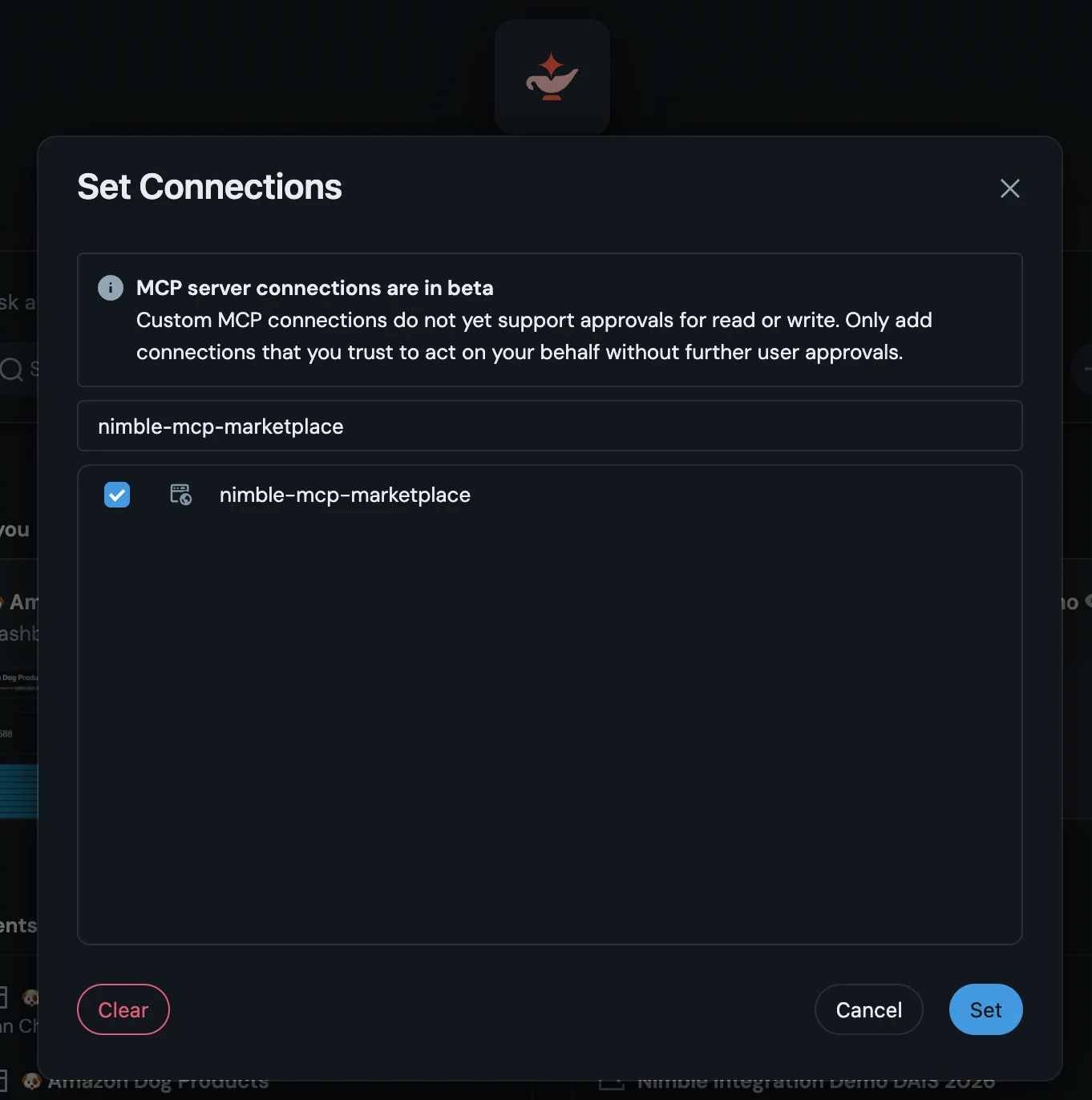
**MCP connections in Genie are in Beta.** As surfaced in the Set Connections dialog: custom MCP connections do not yet support per-action read/write approvals, so only enable connections you trust to act on your behalf. Treat this surface as preview while the feature stabilizes.
## Connect Nimble in Genie One
From the Databricks One workspace switcher (top-right), choose **Genie One — Business insights from data and AI**. The Genie home opens with a single **Ask a question…** box.
In the question box, click the **+** button and choose **More connections…**. The **Set Connections** dialog lists the MCP server connections available to you.
In **Set Connections**, find and check the Nimble connection (for example `nimble-mcp-marketplace`). A Beta banner notes that custom MCP connections act on your behalf without per-action approval — enable only connections you trust.
 Type a question that needs the open web — Genie picks the right Nimble tool, calls it, and answers. You don't name the tool; Genie reads the connection's tool descriptions and decides.
## See it work
Ask Genie a question that the warehouse alone can't answer — something that depends on what's live on the web right now:
> Which noise-cancelling headphones are top-rated this year, and how do their current prices compare? Use Nimble and cite sources.
Genie routes it to the Nimble MCP server and shows the call inline:
* **Calling tool → Running Nimble Search.** Genie expands a thinking trace as it works.
* **Request / Response.** Each completed call shows the exact request Genie sent (`{"query": "best noise-cancelling headphones price comparison", "max_results": 8, "search_depth": "deep", "focus": "shopping"}`) and the raw response — full transparency into what was fetched.
* **Cited answer.** Genie synthesizes the results into a ranked comparison with prices, ratings, and source citations.
Because Genie calls Nimble through the governed Unity Catalog connection, every one of these tool calls is auditable in the [Unity AI Gateway audit table](/integrations/partnerships/databricks/marketplace-mcp#governance-with-unity-ai-gateway) — same as any other proxied Nimble request.
## Try these questions
Paste any of these into Genie One once the Nimble connection is enabled. Each forces a different Nimble tool.
"Search the web for the latest news about \ and summarize what changed this month, with sources."
"Use Nimble to find \'s current headquarters, employee count, and latest funding round, and cite where each fact came from."
"Extract the pricing page at \ and list each plan with its price and key limits."
"Find the top-rated coffee shops in Austin, Texas with their ratings and review counts."
## Roll out across your organization
* **Install once, share the connection.** The Nimble MCP connection is a single Unity Catalog object. Grant **USE CONNECTION** to the business-user groups who should query the web in Genie; they never see or manage the API key.
* **Govern through Unity AI Gateway.** Every Genie-initiated Nimble call routes through the managed proxy and lands in `system.access.audit`. Use the **AI Gateway Usage Analytics** dashboard to track web-tool usage by user — see [Marketplace & MCP](/integrations/partnerships/databricks/marketplace-mcp#governance-with-unity-ai-gateway).
* **Mind the Beta limits.** Custom MCP connections in Genie don't yet gate individual read/write actions behind approval. Until that ships, scope `USE CONNECTION` deliberately and prefer it for read-oriented research use cases.
* **Prefer SQL for batch?** When the job is enriching many rows rather than answering one question, the same Nimble capabilities are available as Unity Catalog table functions — see [Data Enrichment](/integrations/partnerships/databricks/data-enrichment).
## Resources
Install the Nimble MCP connection that Genie connects to, and govern it with Unity AI Gateway
The same Nimble tools as Unity Catalog table functions, for SQL-native batch enrichment
Databricks documentation for Genie and Genie One
How Databricks connects Genie and agents to MCP servers
Full MCP Server setup for Claude, Cursor, and other clients
Setup SQL, tools, and recipes behind the Databricks integration
Type a question that needs the open web — Genie picks the right Nimble tool, calls it, and answers. You don't name the tool; Genie reads the connection's tool descriptions and decides.
## See it work
Ask Genie a question that the warehouse alone can't answer — something that depends on what's live on the web right now:
> Which noise-cancelling headphones are top-rated this year, and how do their current prices compare? Use Nimble and cite sources.
Genie routes it to the Nimble MCP server and shows the call inline:
* **Calling tool → Running Nimble Search.** Genie expands a thinking trace as it works.
* **Request / Response.** Each completed call shows the exact request Genie sent (`{"query": "best noise-cancelling headphones price comparison", "max_results": 8, "search_depth": "deep", "focus": "shopping"}`) and the raw response — full transparency into what was fetched.
* **Cited answer.** Genie synthesizes the results into a ranked comparison with prices, ratings, and source citations.
Because Genie calls Nimble through the governed Unity Catalog connection, every one of these tool calls is auditable in the [Unity AI Gateway audit table](/integrations/partnerships/databricks/marketplace-mcp#governance-with-unity-ai-gateway) — same as any other proxied Nimble request.
## Try these questions
Paste any of these into Genie One once the Nimble connection is enabled. Each forces a different Nimble tool.
"Search the web for the latest news about \ and summarize what changed this month, with sources."
"Use Nimble to find \'s current headquarters, employee count, and latest funding round, and cite where each fact came from."
"Extract the pricing page at \ and list each plan with its price and key limits."
"Find the top-rated coffee shops in Austin, Texas with their ratings and review counts."
## Roll out across your organization
* **Install once, share the connection.** The Nimble MCP connection is a single Unity Catalog object. Grant **USE CONNECTION** to the business-user groups who should query the web in Genie; they never see or manage the API key.
* **Govern through Unity AI Gateway.** Every Genie-initiated Nimble call routes through the managed proxy and lands in `system.access.audit`. Use the **AI Gateway Usage Analytics** dashboard to track web-tool usage by user — see [Marketplace & MCP](/integrations/partnerships/databricks/marketplace-mcp#governance-with-unity-ai-gateway).
* **Mind the Beta limits.** Custom MCP connections in Genie don't yet gate individual read/write actions behind approval. Until that ships, scope `USE CONNECTION` deliberately and prefer it for read-oriented research use cases.
* **Prefer SQL for batch?** When the job is enriching many rows rather than answering one question, the same Nimble capabilities are available as Unity Catalog table functions — see [Data Enrichment](/integrations/partnerships/databricks/data-enrichment).
## Resources
Install the Nimble MCP connection that Genie connects to, and govern it with Unity AI Gateway
The same Nimble tools as Unity Catalog table functions, for SQL-native batch enrichment
Databricks documentation for Genie and Genie One
How Databricks connects Genie and agents to MCP servers
Full MCP Server setup for Claude, Cursor, and other clients
Setup SQL, tools, and recipes behind the Databricks integration