> ## Documentation Index
> Fetch the complete documentation index at: https://docs.nimbleway.com/llms.txt
> Use this file to discover all available pages before exploring further.
# Marketplace & MCP
> Install Nimble MCP Server from the Databricks Marketplace, govern it with Unity AI Gateway, and test it in AI Playground and Databricks Assistant.
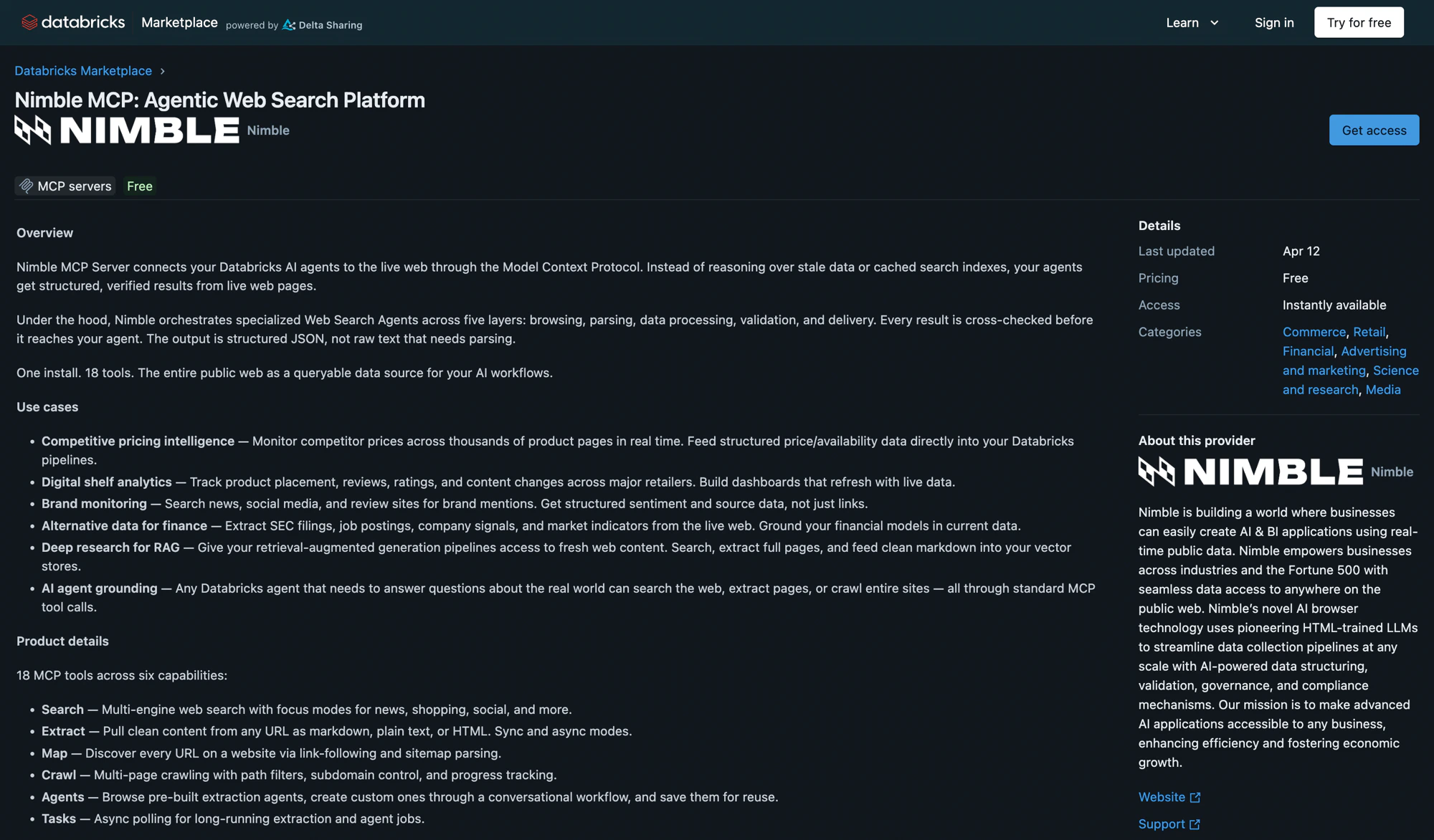
Nimble MCP Server is available on the [Databricks Marketplace](https://marketplace.databricks.com/details/1fe5e521-e9ef-49d8-97c4-b8c0a448ce15/Nimble_Nimble-MCP-Agentic-Web-Search-Platform) as a one-click install. It creates a secure Unity Catalog connection that gives any Databricks agent access to Nimble's full web data platform — search, extract, map, crawl, and structured data extraction. This is the install foundation every other Databricks surface builds on.
 ## Prerequisites
* A Databricks workspace with the **Managed MCP Servers** preview enabled ([manage previews](https://docs.databricks.com/aws/en/admin/workspace-settings/manage-previews))
* `CREATE CONNECTION` privilege on the Unity Catalog metastore
* A Nimble API key — [sign up](https://online.nimbleway.com/signup) and generate one from [Account Settings > API Keys](/nimble-sdk/admin/account-management#api-keys)
## Install from Databricks Marketplace
In your Databricks workspace, go to **Marketplace** and search for **Nimble**.
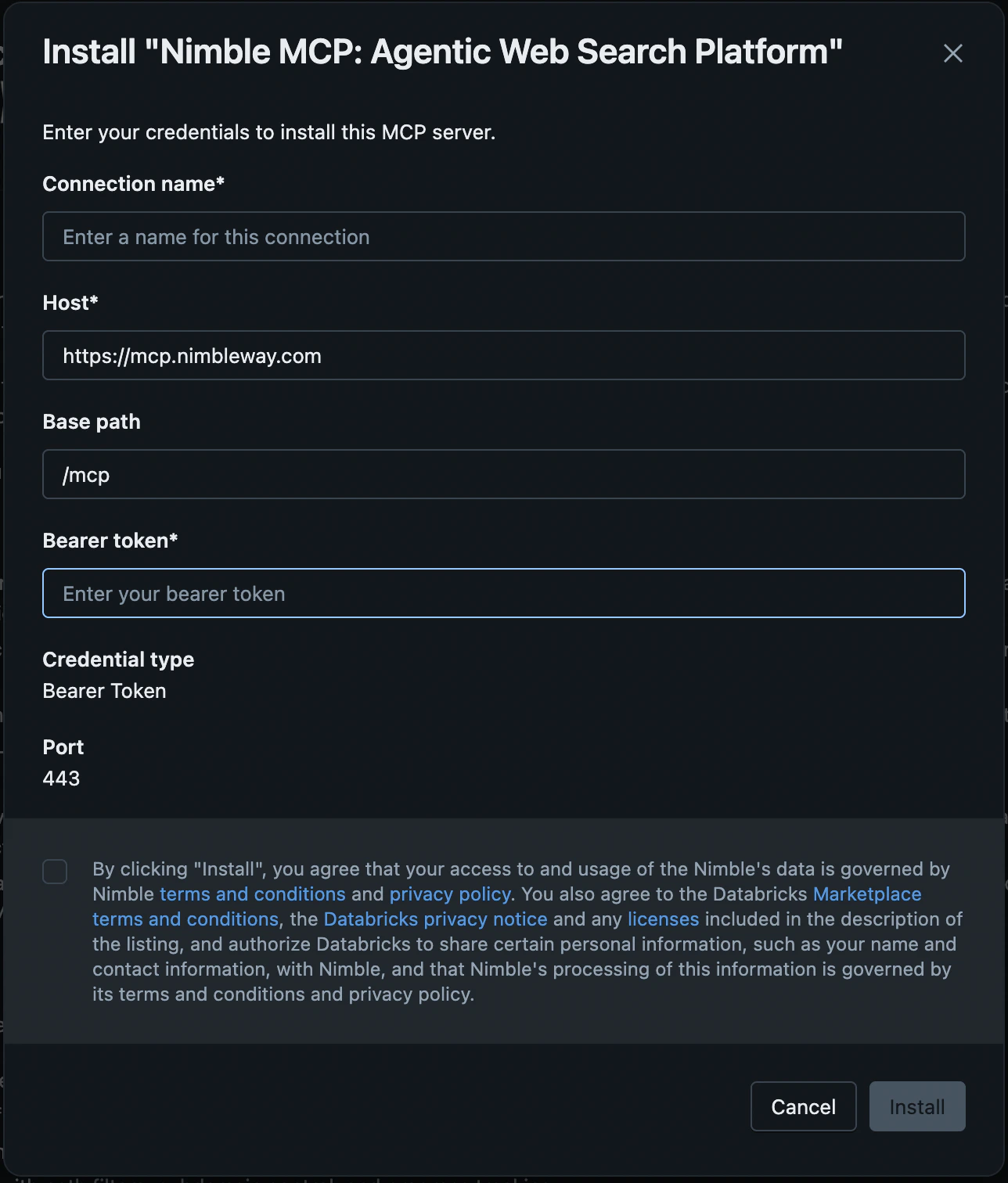
Click **Install**. In the installation dialog, configure:
| Field | Value |
| ------------------- | --------------------------------------------------------------------------- |
| **Connection name** | A name for the Unity Catalog connection (default: `nimble-mcp-marketplace`) |
| **Host** | Pre-populated |
| **Base path** | Pre-populated |
| **Bearer token** | Your Nimble API key |
## Prerequisites
* A Databricks workspace with the **Managed MCP Servers** preview enabled ([manage previews](https://docs.databricks.com/aws/en/admin/workspace-settings/manage-previews))
* `CREATE CONNECTION` privilege on the Unity Catalog metastore
* A Nimble API key — [sign up](https://online.nimbleway.com/signup) and generate one from [Account Settings > API Keys](/nimble-sdk/admin/account-management#api-keys)
## Install from Databricks Marketplace
In your Databricks workspace, go to **Marketplace** and search for **Nimble**.
Click **Install**. In the installation dialog, configure:
| Field | Value |
| ------------------- | --------------------------------------------------------------------------- |
| **Connection name** | A name for the Unity Catalog connection (default: `nimble-mcp-marketplace`) |
| **Host** | Pre-populated |
| **Base path** | Pre-populated |
| **Bearer token** | Your Nimble API key |
 Go to **Agents > MCP Servers** tab and confirm `nimble-mcp-marketplace` appears with status **Active**.
## Share the connection
Grant access so team members can use the Nimble MCP server:
1. Go to **Catalog > Connections** and click the Nimble connection.
2. Open the **Permissions** tab and grant **USE CONNECTION** to the principals that need access.
## Governance with Unity AI Gateway
Once installed, the Nimble connection appears automatically in **Unity AI Gateway > MCPs** as an active MCP server — no extra registration step. Unity AI Gateway is the control plane for AI traffic in Databricks, so every Nimble call routes through its managed proxy and inherits Databricks-native governance.
### Available now
* **Managed proxy and AI Playground** — Nimble is reachable at `https:///api/2.0/mcp/external/` and available in the Playground.
* **Audit and usage tracking** — every proxied Nimble call is recorded in the `system.access.audit` system table with the calling user, connection, HTTP method, and status code. The built-in **AI Gateway Usage Analytics** dashboard visualizes this under the **External MCP Server** tab.
Query your own Nimble usage directly:
```sql theme={"system"}
SELECT event_time,
user_identity.email AS user,
request_params.connection_name AS connection_name,
request_params.http_method AS http_method,
response.status_code AS status_code
FROM system.access.audit
WHERE service_name = 'ucHttpConnection'
AND action_name = 'ucHttpConnectionProxiedRequest'
AND request_params.connection_name ILIKE '%nimble%'
ORDER BY event_time DESC;
```
### Databricks MCP governance Beta
Ask your Databricks account team to enable these on your workspace:
* **Payload logging** — full request and response bodies recorded to a Unity Catalog inference table for audit and replay (the audit table above logs metadata only, not bodies).
* **Service policies** — constrain a Nimble tool with a SQL Unity Catalog function (for example, a domain allowlist on `nimble_search`); the gateway enforces the policy before the call leaves Databricks.
* **Rate limits and cost attribution** — meter and attribute Nimble usage per user and workload.
The Marketplace connection authenticates to Nimble with a shared bearer token, so all traffic shares one Nimble identity. Per-user authentication — where each Databricks user authenticates to Nimble individually (on-behalf-of) so the end-user identity reaches Nimble's logs — is on the roadmap.
## Test in Databricks
### AI Playground
Choose a model with the **Tools enabled** label.
Click **Tools > + Add tool > MCP Servers > External MCP servers** and select the `nimble-mcp-marketplace` connection.
Ask the model to search the web, extract a page, or map a site to verify the tools work.
### Databricks Assistant
1. Open **Databricks Assistant** and click the **Settings** icon.
2. Under **MCP Servers**, click **+ Add MCP Server > External MCP servers** and select the `nimble-mcp-marketplace` connection.
Once the connection is verified here, point a production agent at the same proxy URL. The [Nimble MCP + Databricks notebook](https://github.com/Nimbleway/cookbook/blob/main/nimble-mcp-server/databricks-agent/nimble-mcp-databricks-marketplace.ipynb) walks through connecting a Databricks-hosted LLM to Nimble tools with LangGraph and the `DatabricksMCPClient`.
## Resources
Install Nimble MCP Server directly from the Marketplace
Full MCP Server setup for Claude, Cursor, and other clients
Databricks documentation for external MCP server connections
Call Nimble as SQL table functions to enrich Delta tables at scale
Go to **Agents > MCP Servers** tab and confirm `nimble-mcp-marketplace` appears with status **Active**.
## Share the connection
Grant access so team members can use the Nimble MCP server:
1. Go to **Catalog > Connections** and click the Nimble connection.
2. Open the **Permissions** tab and grant **USE CONNECTION** to the principals that need access.
## Governance with Unity AI Gateway
Once installed, the Nimble connection appears automatically in **Unity AI Gateway > MCPs** as an active MCP server — no extra registration step. Unity AI Gateway is the control plane for AI traffic in Databricks, so every Nimble call routes through its managed proxy and inherits Databricks-native governance.
### Available now
* **Managed proxy and AI Playground** — Nimble is reachable at `https:///api/2.0/mcp/external/` and available in the Playground.
* **Audit and usage tracking** — every proxied Nimble call is recorded in the `system.access.audit` system table with the calling user, connection, HTTP method, and status code. The built-in **AI Gateway Usage Analytics** dashboard visualizes this under the **External MCP Server** tab.
Query your own Nimble usage directly:
```sql theme={"system"}
SELECT event_time,
user_identity.email AS user,
request_params.connection_name AS connection_name,
request_params.http_method AS http_method,
response.status_code AS status_code
FROM system.access.audit
WHERE service_name = 'ucHttpConnection'
AND action_name = 'ucHttpConnectionProxiedRequest'
AND request_params.connection_name ILIKE '%nimble%'
ORDER BY event_time DESC;
```
### Databricks MCP governance Beta
Ask your Databricks account team to enable these on your workspace:
* **Payload logging** — full request and response bodies recorded to a Unity Catalog inference table for audit and replay (the audit table above logs metadata only, not bodies).
* **Service policies** — constrain a Nimble tool with a SQL Unity Catalog function (for example, a domain allowlist on `nimble_search`); the gateway enforces the policy before the call leaves Databricks.
* **Rate limits and cost attribution** — meter and attribute Nimble usage per user and workload.
The Marketplace connection authenticates to Nimble with a shared bearer token, so all traffic shares one Nimble identity. Per-user authentication — where each Databricks user authenticates to Nimble individually (on-behalf-of) so the end-user identity reaches Nimble's logs — is on the roadmap.
## Test in Databricks
### AI Playground
Choose a model with the **Tools enabled** label.
Click **Tools > + Add tool > MCP Servers > External MCP servers** and select the `nimble-mcp-marketplace` connection.
Ask the model to search the web, extract a page, or map a site to verify the tools work.
### Databricks Assistant
1. Open **Databricks Assistant** and click the **Settings** icon.
2. Under **MCP Servers**, click **+ Add MCP Server > External MCP servers** and select the `nimble-mcp-marketplace` connection.
Once the connection is verified here, point a production agent at the same proxy URL. The [Nimble MCP + Databricks notebook](https://github.com/Nimbleway/cookbook/blob/main/nimble-mcp-server/databricks-agent/nimble-mcp-databricks-marketplace.ipynb) walks through connecting a Databricks-hosted LLM to Nimble tools with LangGraph and the `DatabricksMCPClient`.
## Resources
Install Nimble MCP Server directly from the Marketplace
Full MCP Server setup for Claude, Cursor, and other clients
Databricks documentation for external MCP server connections
Call Nimble as SQL table functions to enrich Delta tables at scale