> ## Documentation Index
> Fetch the complete documentation index at: https://docs.nimbleway.com/llms.txt
> Use this file to discover all available pages before exploring further.
# App Builder Skills
> Nimble's agentic App Builder Skills for Snowflake. Each turns a short brief into a working in-tenant data product: a ready-to-use Streamlit cockpit, a Cortex agent, and live Nimble web data. Run them from Cortex Code, or attach them to a Cortex Agent for Snowflake CoWork.
Nimble ships a family of **App Builder Skills**: packaged [Snowflake Agent Skills](https://docs.snowflake.com/en/user-guide/cortex-code/extensibility) that take a short brief and provision a complete, in-tenant data product. One brief stands up a ready-to-use Streamlit cockpit, a Cortex agent, and live Nimble web data, end to end, without leaving the Snowflake account.
Because they're standard Snowflake Agent Skills, the same skill runs from either agentic surface:
* **[Cortex Code](/integrations/partnerships/snowflake/cortex-code) (CoCo).** Load the skill into the CLI and invoke it in a session.
* **[Snowflake CoWork](https://www.snowflake.com/en/product/snowflake-cowork/) (formerly Snowflake Intelligence).** Attach the skill to a Cortex Agent and chat with it.
The [Cortex Code MCP install](/integrations/partnerships/snowflake/cortex-code) puts Nimble's toolkit into a session and [Cortex Agents](/integrations/partnerships/snowflake/cortex-agents) expose Search and Extract as SQL. App Builder Skills go further and *build*: they stand up the schema, the scheduled ingestion, the views, the agent, and the cockpit for you.
Every skill is config-driven and self-contained: the app it builds stays updatable after creation (add a keyword and the next refresh picks it up), and nothing leaves your Snowflake account.
## Prerequisites
All App Builder Skills share one foundation:
* The **Nimble × Snowflake integration**: the External Access Integration, the API-key secret, the `NIMBLE_AGENT_RUN` UDTF, and the `NIMBLE_SEARCH` UDF. See [Cortex Agents](/integrations/partnerships/snowflake/cortex-agents) for the setup. A skill verifies these at runtime and can guided-install them, but only with explicit consent and your Nimble API key, run as `ACCOUNTADMIN`.
* **Cortex Agents enabled** on the account, and a role that can create schemas in the target database.
## Use a skill
### From Cortex Code (CLI)
The quickest path is `/skill add` with the skill's folder URL from the cookbook, not the whole repo:
```bash theme={"system"}
# In a Cortex Code session
/skill add https://github.com/Nimbleway/cookbook/tree/main/snowflake/coco-skills/cmo-intelligence
/skill list
```
Then reference the skill by name in conversation. For example: `$cmo-intelligence build a digital-shelf app for the coffee category`.
### As a Cortex Agent (Snowflake CoWork)
Stand up a **Nimble App Builder** agent once, then anyone can build apps by chatting with it in [Snowflake CoWork](https://www.snowflake.com/en/product/snowflake-cowork/) (formerly Snowflake Intelligence), no CLI required. The agent loads its skills straight from the cookbook Git repository, so updates are a `FETCH` away. Run the quick-start as `ACCOUNTADMIN`.
Create a Git API integration scoped to the Nimble org, register the cookbook repository, and fetch it. The agent reads its skill files from here.
```sql theme={"system"}
USE ROLE ACCOUNTADMIN;
CREATE OR REPLACE API INTEGRATION NIMBLE_COOKBOOK_GIT_API
API_PROVIDER = git_https_api
API_ALLOWED_PREFIXES = ('https://github.com/Nimbleway/')
ENABLED = TRUE;
CREATE OR REPLACE GIT REPOSITORY NIMBLE_INTEGRATION.TOOLS.NIMBLE_COOKBOOK
ORIGIN = 'https://github.com/Nimbleway/cookbook.git'
API_INTEGRATION = NIMBLE_COOKBOOK_GIT_API;
ALTER GIT REPOSITORY NIMBLE_INTEGRATION.TOOLS.NIMBLE_COOKBOOK FETCH;
```
The agent provisions apps by running SQL: DDL, DML, `CALL`, `EXECUTE TASK`, `GRANT`. This MCP server gives it that capability, scoped to the integration's warehouse.
```sql theme={"system"}
CREATE OR REPLACE MCP SERVER NIMBLE_INTEGRATION.TOOLS.SQL_EXEC_SERVER
FROM SPECIFICATION $$
tools:
- title: "SQL Execution Tool"
name: "sql_exec_tool"
type: "SYSTEM_EXECUTE_SQL"
description: "Execute any SQL statement against Snowflake — DDL, DML, queries, CALL procedures, EXECUTE TASK, GRANT, and more."
config:
read_only: false
query_timeout: 600
warehouse: "NIMBLE_AGENT_WH"
$$;
```
Attach one or more skills from the Git repository. **Each skill defines a different app type, and the agent routes a request to the matching one.** Add a skill by listing another entry under `skills:`.
```sql theme={"system"}
CREATE OR REPLACE AGENT NIMBLE_INTEGRATION.TOOLS.NIMBLE_APP_BUILDER
PROFILE = '{"display_name":"Nimble App Builder","avatar":"SparklesAgentIcon"}'
COMMENT = 'Builds and provisions complete Snowflake apps powered by live Nimble web data.'
FROM SPECIFICATION
$$
models:
orchestration: auto
instructions:
orchestration: |
You are the Nimble App Builder — you build and provision complete Snowflake apps powered by live web data from Nimble.
You have one or more skills attached. Each skill defines a different type of app you can build (e.g. CMO digital-shelf intelligence, competitive pricing, etc.). When the user asks you to build something, identify which skill matches their request and follow that skill's instructions precisely.
General rules across all skills:
- Always confirm the user's intent and parameters before creating anything.
- Use EXECUTE TASK for long-running operations — never block the session with a synchronous CALL.
- One app = one schema. Check for existing apps before creating to avoid clobbering live data.
- Substitute all template placeholders before running SQL.
- End every successful build by delivering the key access points (URLs, agent names, dashboards).
If the user's request doesn't match any attached skill, say so clearly and describe what you can build today.
response: |
Be concise and action-oriented. Lead with what you did or need. Show proposals as formatted lists for easy review. After building, deliver access points clearly.
sample_questions:
- question: Build a digital-shelf app for the coffee category, focal brand Nespresso
- question: Set up CMO intelligence for Pampers in diapers
- question: What kinds of apps can you build?
- question: Monitor the chocolate category on Walmart, Amazon, and Target
tools:
- tool_spec:
type: web_search
name: web_search
skills:
- name: cmo-intelligence
source:
type: GIT
path: "@NIMBLE_INTEGRATION.TOOLS.NIMBLE_COOKBOOK/branches/main/snowflake/coco-skills/cmo-intelligence"
tool_resources:
web_search:
max_results: 10
mcp_servers:
- server_spec:
name: "NIMBLE_INTEGRATION.TOOLS.SQL_EXEC_SERVER"
$$;
```
Confirm the agent registered:
```sql theme={"system"}
DESCRIBE AGENT NIMBLE_INTEGRATION.TOOLS.NIMBLE_APP_BUILDER;
```
Then open Snowflake CoWork, pick **Nimble App Builder**, and describe the app you want.
Pulled a newer version of a skill? Re-run `ALTER GIT REPOSITORY NIMBLE_INTEGRATION.TOOLS.NIMBLE_COOKBOOK FETCH;` to refresh the repository, then `CREATE OR REPLACE AGENT …` to pick it up.
## Skills gallery
Each skill is a different app type you can install and run from either surface. More are on the way; here's what's available today.
### CMO Intelligence
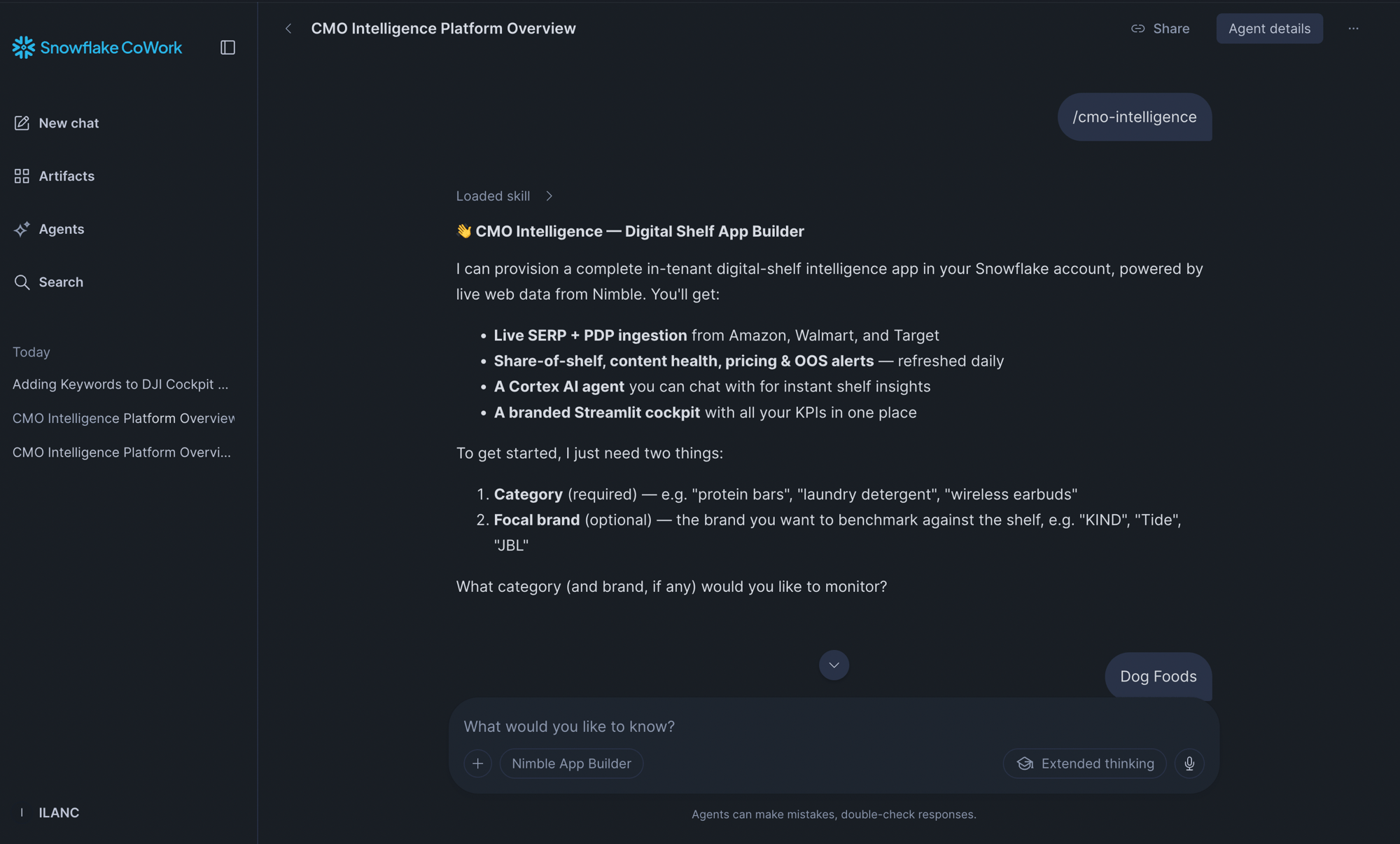
Name a category (a brand is optional), and the **CMO Intelligence** skill turns the brief into a working digital-shelf intelligence app covering share of shelf, pricing, content health, and sentiment, with live Nimble web data, a Cortex agent, and a ready-to-use Streamlit cockpit.
 **What it builds.** One brief stands up a complete, self-contained app in its own schema:
* **A per-app schema.** Each provision targets its own `.`, so apps never collide and a live app is never clobbered.
* **Config tables as the source of truth.** `CFG_APP` and `CFG_QUERIES` hold the brand, keywords, retailers, and geography; the views and the scheduled Task read from them, so the app stays updatable after creation.
* **Scheduled web-data ingestion.** A `DAILY_SHELF_TASK` calls `REFRESH_SHELF()`, which pulls search and product-page data through the `NIMBLE_AGENT_RUN` UDTF and lands it in raw tables: SERP via a lateral join, the high-volume PDP fan-out concurrently.
* **A Cortex brand resolver.** `REBUILD_BRAND_MAP()` normalizes raw product titles into a `BRAND_MAP` using a fast Cortex model, so share-of-shelf and focal-brand tagging stay accurate. It refreshes on every run.
* **Analytics views.** Share of shelf, content health, out-of-stock alerts, daily trends, sentiment summary, share of AI answer, and next-best-actions.
* **A Cortex Analyst semantic view.** `SHELF_SV` exposes the analytics layer for natural-language questions.
* **A Cortex agent.** `_SHELF_ANALYST` answers shelf and price questions over `SHELF_SV`, and carries a live-web `NIMBLE_SEARCH` tool for fresh context mid-conversation.
* **A ready-to-use Streamlit cockpit.** A per-app Streamlit-in-Snowflake app (named per app, e.g. `_CMO_COCKPIT`) with pricing, digital shelf, and sentiment surfaces, ready on first open.
**Ask for an app.** Describe the goal. A category is required; a focal brand is optional. In Cortex Code, prefix with `$cmo-intelligence`; in CoWork, just ask the Nimble App Builder agent:
* `set up CMO intelligence for the chocolate category, focal brand Acme`
* `build a digital-shelf app for the coffee category`
* `monitor our category on Walmart, Amazon, and Target`
The skill confirms the details with you, then provisions the app and returns the cockpit URL, the agent name, and a headline takeaway (such as the focal brand's share of shelf).
**How it works.**
1. **Preflight:** verifies the integration's functions exist (`NIMBLE_AGENT_RUN` + `NIMBLE_SEARCH`), resolves the available Cortex models, confirms the target database and warehouse, and checks for an existing app in the target schema.
2. **Intake:** the "category architect" proposes the focal brand, \~6 keywords, focal-brand patterns, and a schema name from the category, then shows the proposal for confirmation. Defaults: Walmart / Amazon / Target, US geography, daily refresh.
3. **Provision:** runs the SQL templates in order, creating every object above, from the config tables through the `_SHELF_ANALYST` Cortex agent.
4. **Seed:** fires `DAILY_SHELF_TASK` server-side for the first snapshot (focal-first, so the cockpit has real content fast), then deploys the Streamlit cockpit to a per-app stage.
5. **Verify and deliver:** confirms the full object set exists and the views are populated, then returns the cockpit URL, the agent, and the headline insight.
The CMO Intelligence skill: SKILL.md, the SQL templates, the cockpit, and the bundled integration
## Resources
Every Nimble App Builder Skill, with SKILL.md, SQL templates, and install guides
Install the Nimble MCP server in Cortex Code for ad-hoc web data in any session
The `NIMBLE_SEARCH` / `NIMBLE_EXTRACT` UDFs and the integration these skills build on
Snowflake's guide to creating, installing, and invoking custom Cortex Code skills
**What it builds.** One brief stands up a complete, self-contained app in its own schema:
* **A per-app schema.** Each provision targets its own `.`, so apps never collide and a live app is never clobbered.
* **Config tables as the source of truth.** `CFG_APP` and `CFG_QUERIES` hold the brand, keywords, retailers, and geography; the views and the scheduled Task read from them, so the app stays updatable after creation.
* **Scheduled web-data ingestion.** A `DAILY_SHELF_TASK` calls `REFRESH_SHELF()`, which pulls search and product-page data through the `NIMBLE_AGENT_RUN` UDTF and lands it in raw tables: SERP via a lateral join, the high-volume PDP fan-out concurrently.
* **A Cortex brand resolver.** `REBUILD_BRAND_MAP()` normalizes raw product titles into a `BRAND_MAP` using a fast Cortex model, so share-of-shelf and focal-brand tagging stay accurate. It refreshes on every run.
* **Analytics views.** Share of shelf, content health, out-of-stock alerts, daily trends, sentiment summary, share of AI answer, and next-best-actions.
* **A Cortex Analyst semantic view.** `SHELF_SV` exposes the analytics layer for natural-language questions.
* **A Cortex agent.** `_SHELF_ANALYST` answers shelf and price questions over `SHELF_SV`, and carries a live-web `NIMBLE_SEARCH` tool for fresh context mid-conversation.
* **A ready-to-use Streamlit cockpit.** A per-app Streamlit-in-Snowflake app (named per app, e.g. `_CMO_COCKPIT`) with pricing, digital shelf, and sentiment surfaces, ready on first open.
**Ask for an app.** Describe the goal. A category is required; a focal brand is optional. In Cortex Code, prefix with `$cmo-intelligence`; in CoWork, just ask the Nimble App Builder agent:
* `set up CMO intelligence for the chocolate category, focal brand Acme`
* `build a digital-shelf app for the coffee category`
* `monitor our category on Walmart, Amazon, and Target`
The skill confirms the details with you, then provisions the app and returns the cockpit URL, the agent name, and a headline takeaway (such as the focal brand's share of shelf).
**How it works.**
1. **Preflight:** verifies the integration's functions exist (`NIMBLE_AGENT_RUN` + `NIMBLE_SEARCH`), resolves the available Cortex models, confirms the target database and warehouse, and checks for an existing app in the target schema.
2. **Intake:** the "category architect" proposes the focal brand, \~6 keywords, focal-brand patterns, and a schema name from the category, then shows the proposal for confirmation. Defaults: Walmart / Amazon / Target, US geography, daily refresh.
3. **Provision:** runs the SQL templates in order, creating every object above, from the config tables through the `_SHELF_ANALYST` Cortex agent.
4. **Seed:** fires `DAILY_SHELF_TASK` server-side for the first snapshot (focal-first, so the cockpit has real content fast), then deploys the Streamlit cockpit to a per-app stage.
5. **Verify and deliver:** confirms the full object set exists and the views are populated, then returns the cockpit URL, the agent, and the headline insight.
The CMO Intelligence skill: SKILL.md, the SQL templates, the cockpit, and the bundled integration
## Resources
Every Nimble App Builder Skill, with SKILL.md, SQL templates, and install guides
Install the Nimble MCP server in Cortex Code for ad-hoc web data in any session
The `NIMBLE_SEARCH` / `NIMBLE_EXTRACT` UDFs and the integration these skills build on
Snowflake's guide to creating, installing, and invoking custom Cortex Code skills