> ## Documentation Index
> Fetch the complete documentation index at: https://docs.nimbleway.com/llms.txt
> Use this file to discover all available pages before exploring further.
# Cortex Code
> Install Nimble MCP in Snowflake's native AI coding agent. One command, OAuth sign-in, full web data toolkit in every Cortex Code session.
[Cortex Code](https://docs.snowflake.com/en/user-guide/cortex-code/cortex-code), Snowflake's native AI coding agent for the terminal, is the first surface for connecting Nimble to Snowflake. One `cortex mcp add` command and an OAuth sign-in put Nimble's full toolkit into every Cortex Code session.
## What you get
* **Nimble's web data toolkit** in Cortex Code, exposed as `mcp__nimble__*` tools
* **One-command install.** No JSON to edit by hand.
* **OAuth 2.1 sign-in with PKCE.** No API key to paste, manage, or rotate. Tokens are stored in your OS keychain and refreshed automatically.
* **Streamable HTTP transport** at `https://mcp.nimbleway.com/mcp`
## Prerequisites
* [Snowflake Cortex Code CLI](https://docs.snowflake.com/en/user-guide/cortex-code/cortex-code-cli) installed and on your `PATH`
* A valid Snowflake connection in `~/.snowflake/connections.toml` (run `cortex` once to set this up)
* A Nimble account ([sign up free](https://online.nimbleway.com/signup))
## Install Nimble MCP in Cortex Code
Run a single command from your terminal:
```bash theme={"system"}
cortex mcp add nimble https://mcp.nimbleway.com/mcp --transport http
```
Cortex Code writes the server to `~/.snowflake/cortex/mcp.json` under the `mcpServers` key. No `Authorization` header is needed. Nimble's MCP server advertises OAuth and Cortex Code handles the flow on first connection.
On the first connection, Cortex Code opens your system browser to authenticate. Approve the requested scopes; Cortex Code stores the access and refresh tokens in your OS keychain (`mcp_oauth_nimble`) and refreshes them automatically before expiry.
List configured servers and trigger a connect:
```bash theme={"system"}
cortex mcp list
cortex mcp start
```
`cortex mcp start` reports connected and failed counts and waits up to 300 seconds for each server to load. Once `nimble` shows as connected, its tools are namespaced as `mcp__nimble__search`, `mcp__nimble__extract`, `mcp__nimble__map`, `mcp__nimble__crawl`, and so on.
Start a session with `cortex` and ask the agent for anything that needs the live web. Cortex Code picks the right Nimble tool and runs it. No need to name the tool explicitly.
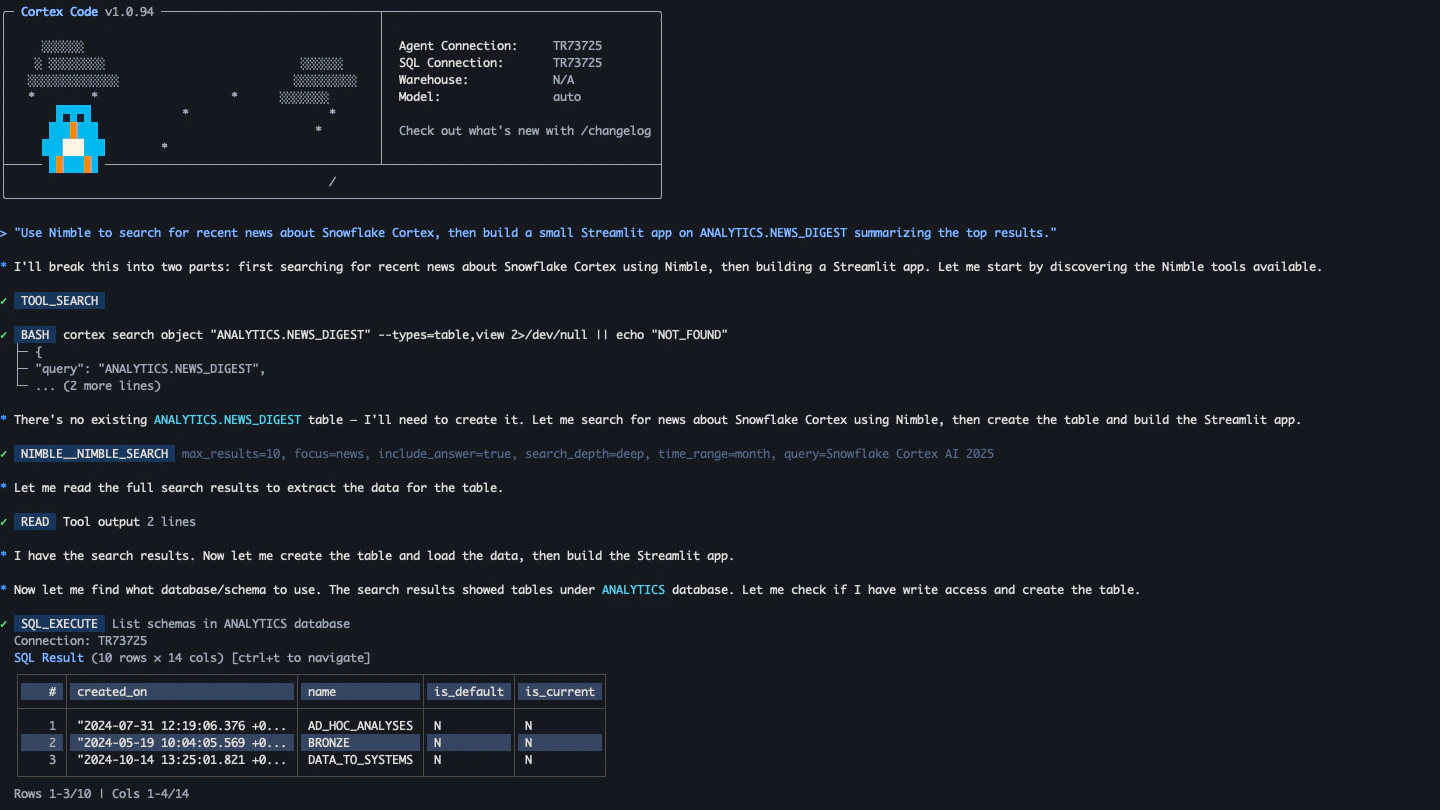 ## Try these prompts
Paste any of these into a Cortex Code session. The agent picks the right Nimble tool and the right Snowflake skill, and chains them together.
"For each domain in `ANALYTICS.CUSTOMERS.COMPANY_DOMAIN`, use Nimble to extract the company's current employee count and headquarters. Write results to `ANALYTICS.STAGING.COMPANY_ENRICHMENT`."
"Check each product URL in `PRODUCT_CATALOG.URL` with Nimble Extract, flagging rows where the product is no longer available and writing them to `DATA_QUALITY.STALE_PRODUCTS`."
"Build a Streamlit app on `SALES_MART.REVENUE` that shows our top 10 accounts and uses Nimble Search to surface recent news for each one in a side panel."
"I'm scoping a competitive-research Cortex Agent. Use Nimble search and extract here so I can iterate on prompts and tool outputs, then turn the working chain into a Cortex Agent definition."
## Roll out Nimble across your organization
Cortex Code admins can enforce Nimble MCP for an entire Snowflake account through Cortex Code's [managed settings](https://docs.snowflake.com/en/user-guide/cortex-code/managed-settings). Add Nimble to the administrator-enforced `mcpServers` block (and optionally the URL allowlist), so every developer using Cortex Code gets the same connection without copy-pasting a command, and unsanctioned MCP servers are filtered out at merge time.
```json theme={"system"}
{
"mcpServers": {
"nimble": {
"type": "http",
"url": "https://mcp.nimbleway.com/mcp"
}
}
}
```
Pair this with `permissions.json` to pre-approve safe Nimble tools (`mcp__nimble__search`, `mcp__nimble__extract`) and require confirmation on long-running ones (`mcp__nimble__crawl`).
## Resources
Full MCP Server setup for Cursor, Claude, and other clients
Snowflake's docs for installing and using the Cortex Code CLI
Transport types, configuration schema, and credential handling
Enforce Nimble MCP across your Snowflake organization
## Try these prompts
Paste any of these into a Cortex Code session. The agent picks the right Nimble tool and the right Snowflake skill, and chains them together.
"For each domain in `ANALYTICS.CUSTOMERS.COMPANY_DOMAIN`, use Nimble to extract the company's current employee count and headquarters. Write results to `ANALYTICS.STAGING.COMPANY_ENRICHMENT`."
"Check each product URL in `PRODUCT_CATALOG.URL` with Nimble Extract, flagging rows where the product is no longer available and writing them to `DATA_QUALITY.STALE_PRODUCTS`."
"Build a Streamlit app on `SALES_MART.REVENUE` that shows our top 10 accounts and uses Nimble Search to surface recent news for each one in a side panel."
"I'm scoping a competitive-research Cortex Agent. Use Nimble search and extract here so I can iterate on prompts and tool outputs, then turn the working chain into a Cortex Agent definition."
## Roll out Nimble across your organization
Cortex Code admins can enforce Nimble MCP for an entire Snowflake account through Cortex Code's [managed settings](https://docs.snowflake.com/en/user-guide/cortex-code/managed-settings). Add Nimble to the administrator-enforced `mcpServers` block (and optionally the URL allowlist), so every developer using Cortex Code gets the same connection without copy-pasting a command, and unsanctioned MCP servers are filtered out at merge time.
```json theme={"system"}
{
"mcpServers": {
"nimble": {
"type": "http",
"url": "https://mcp.nimbleway.com/mcp"
}
}
}
```
Pair this with `permissions.json` to pre-approve safe Nimble tools (`mcp__nimble__search`, `mcp__nimble__extract`) and require confirmation on long-running ones (`mcp__nimble__crawl`).
## Resources
Full MCP Server setup for Cursor, Claude, and other clients
Snowflake's docs for installing and using the Cortex Code CLI
Transport types, configuration schema, and credential handling
Enforce Nimble MCP across your Snowflake organization