> ## Documentation Index
> Fetch the complete documentation index at: https://docs.nimbleway.com/llms.txt
> Use this file to discover all available pages before exploring further.
# Web Search Agents
> Turn complex web research tasks into a repeatable API call — with an expert agent that improves every run
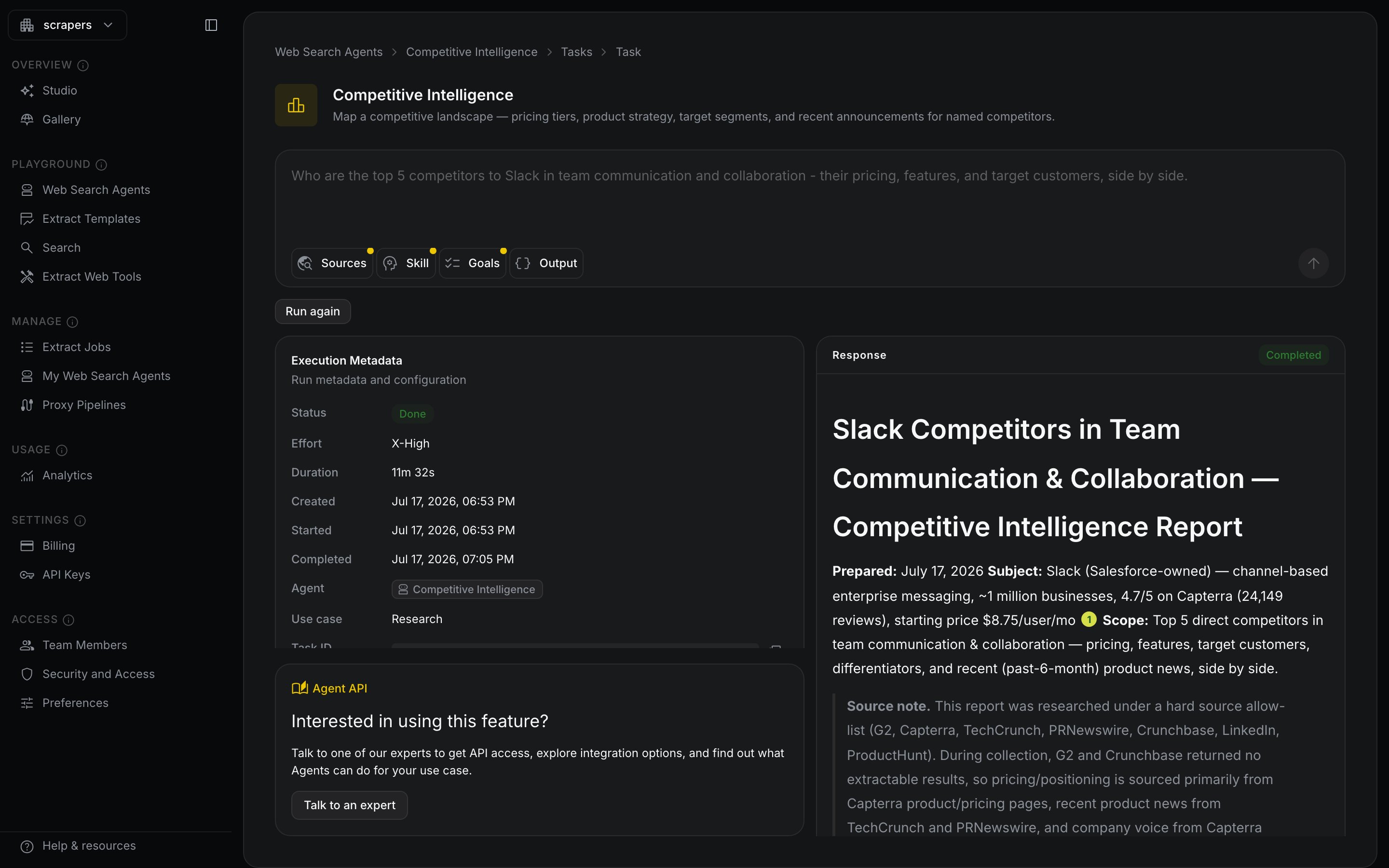
**Web Search Agents** turn complex web research tasks into repeatable API calls. Describe the task in plain language — the agent plans the work, searches and extracts across the live web, reasons over what it finds, and returns a cited answer or a structured dataset.
Generic search tools treat every use case the same. A Web Search Agent is an **expert you shape**: it learns your domain, remembers what worked, and improves with every run — while staying fully controllable and auditable.
Run a research task in the browser — no code, no setup
Zero to a cited answer in three API calls
## Input and output
One request in:
```json theme={"system"}
{ "input": "Compare the pricing and positioning of Datadog and Grafana Cloud." }
```
One deliverable out:
```text theme={"system"}
Datadog anchors the premium end of the market, with Pro pricing
from $15 per host per month [1]. Grafana Cloud undercuts it with
a free tier and usage-based pricing [2], positioning itself for
teams that want to start small...
[1] datadoghq.com/pricing — "Pro: starting at $15 per host, per month"
[2] grafana.com/pricing — "Start for free, pay as you go"
```
Each `[n]` marker resolves to a machine-readable claim with source URLs, verbatim excerpts, and a confidence grade. See [Trust](/nimble-sdk/web-search-agents/trust).
Run it yourself — [in the Playground](https://online.nimbleway.com/playground) or from code:
```python Python theme={"system"}
from nimble_python import Nimble
nimble = Nimble(api_key="YOUR-API-KEY")
run = nimble.agents.run(
input="Compare the pricing and positioning of Datadog and Grafana Cloud."
)
```
```typescript TypeScript theme={"system"}
import Nimble from "@nimble-way/nimble-js";
const nimble = new Nimble({ apiKey: process.env.NIMBLE_API_KEY });
const run = await nimble.agents.run({
input: "Compare the pricing and positioning of Datadog and Grafana Cloud.",
});
```
```go Go theme={"system"}
client := nimble.NewClient(option.WithAPIKey("YOUR-API-KEY"))
run, err := client.Agents.Run(ctx, nimble.AgentRunParams{
Input: "Compare the pricing and positioning of Datadog and Grafana Cloud.",
})
```
```bash CLI theme={"system"}
nimble agents run \
--input "Compare the pricing and positioning of Datadog and Grafana Cloud."
```
```bash cURL theme={"system"}
curl -X POST 'https://sdk.nimbleway.com/v2/agents/runs' \
--header 'Authorization: Bearer ' \
--header 'Content-Type: application/json' \
--data '{
"input": "Compare the pricing and positioning of Datadog and Grafana Cloud."
}'
```
Runs are asynchronous — poll for the result or stream progress events. The [Quickstart](/nimble-sdk/web-search-agents/quickstart) walks through the full loop.
## What you can build
Every agent works in one of three modes, set by its `use_case`:
**Answer hard questions.** Competitive intelligence, due diligence, market and sentiment analysis — cited briefs on demand.
**Complete your data.** Send CRM rows or product records with gaps, get them back filled — every added value cited.
**Discover from scratch.** One prompt in, a structured dataset out — every cell with its own evidence.
| Mode | You send | You get back |
| -------------------- | -------------------------------------------------------- | ---------------------------------------- |
| **Research** | *"How is Acme positioned against its competitors?"* | A cited analyst brief |
| **Enrichment** | 500 CRM rows with missing funding data + a schema | The same 500 rows, gaps filled and cited |
| **Dataset Building** | *"Find all spas and salons in New York City"* + a schema | Fresh rows discovered from the live web |
Build the agent your workflow needs: a **Company Research Agent** that maintains living company profiles, a **Consumer Sentiment Agent** that reads reviews and forums, a **Lead Enrichment Agent** that completes your pipeline — or start from a [pre-built template](#start-from-a-template).
## Start from a template
Templates ship with goals, source guidance, a skill briefing, and output schemas already tuned. Create your own copy with one call and customize from there:
```python Python theme={"system"}
agent = nimble.agents.create(template="due-diligence")
```
```typescript TypeScript theme={"system"}
const agent = await nimble.agents.create({ template: "due-diligence" });
```
```go Go theme={"system"}
agent, err := client.Agents.New(ctx, nimble.AgentNewParams{
Template: param.NewOpt("due-diligence"),
})
```
```bash CLI theme={"system"}
nimble agents create --template due-diligence
```
```bash cURL theme={"system"}
curl -X POST 'https://sdk.nimbleway.com/v2/agents' \
--header 'Authorization: Bearer ' \
--header 'Content-Type: application/json' \
--data '{"template": "due-diligence"}'
```
| Mode | Templates |
| -------------------- | ------------------------------------------------------------------------------------------------------------------------------------- |
| **Research** | `competitive-intelligence` · `due-diligence` · `brand-intelligence` · `company-profile` · `price-comparison` · `real-estate-research` |
| **Enrichment** | `lead-enrichment` · `financial-intelligence` · `ecommerce-intelligence` |
| **Dataset Building** | `business-discovery` · `company-discovery` · `gtm-lead-discovery` · `open-positions-search` · `social-media-monitor` |
List them with [`GET /v2/agents/templates`](/api-reference/public-api/list-agent-templates) — each returns its full configuration, suggested prompts, and an example result.
## Why it's different
Generic web search has no idea what your agent is trying to accomplish. A Web Search Agent does — because it's **stateful, self-improving, and configurable to perfection**:
* **An expert, not a generic index.** The agent learns your use case through its `skill`, `goals`, and `sources` — what dimensions matter, what jargon means, which sources to trust, and what a good result looks like.
* **Self-improving.** **Memory** captures what worked — sources, retrieval paths, domain patterns — and feeds every future run. **Storage** keeps collected data and outputs so runs build on each other instead of starting from zero. Recurring tasks get faster, more accurate, and up to 50% cheaper.
* **Trustworthy.** Every run returns a [trust report](/nimble-sdk/web-search-agents/trust): per-claim citations with verbatim excerpts, graded confidence, and the full list of sources consulted — auditable end to end.
* **Full web access.** Agents run on Nimble's web tools — [Search](/nimble-sdk/web-tools/search), [Extract](/nimble-sdk/web-tools/extract/quickstart) with JS rendering and stealth mode, [Extract Templates](/nimble-sdk/web-tools/extract/template), and [Crawl](/nimble-sdk/web-tools/crawl) — reaching data that generic tools can't.
 ## How it works
Plain language, like briefing an analyst. Optionally add a JSON Schema to get structured data back.
It breaks the task into checkable goals and search steps, informed by its skill and everything in memory.
The agent works across dozens to hundreds of pages, cross-checking conflicting sources and ranking them by authority.
A prose answer or JSON matching your schema — plus the trust report grading the evidence behind every claim.
## Configure it to perfection
`agents.run` works with zero configuration. For repeat work, create a persistent agent and tune every dimension:
| Field | What it does |
| --------------- | -------------------------------------------------------------------------------------------------------------- |
| `skill` | A briefing that makes the agent think like your analyst — what dimensions matter, what jargon means |
| `goals` | Checkable objectives the agent works through on every run |
| `sources` | Allow-lists, block-lists, and hints like *"official pricing pages over third-party summaries"* |
| `effort` | A dial from `low` (quick sweep) to `x-high` (exhaustive). See [Efforts](/nimble-sdk/web-search-agents/efforts) |
| `output_schema` | A JSON Schema — answers arrive as data, every value cited |
| `use_case` | `research`, `enrichment`, or `dataset_building` |
## Runs at any scale
Stream a single run's progress as [server-sent events](/api-reference/public-api/stream-agent-run-events), chain follow-up runs with `previous_interaction_id`, or hand the agent to [Jobs](/nimble-sdk/agentic/jobs) to run on a schedule across thousands of inputs with managed delivery.
Building AI agents? Web Search Agents are available as tools on the [Nimble MCP server](/integrations/mcp-server/mcp-server) — call them from Claude, Cursor, or any MCP client in production.
## Zero Data Retention
Web Search Agents support Zero Data Retention (ZDR) on enterprise plans. With ZDR enabled, your prompts, input data, and outputs are retained only within the window defined in your contract — and are never used for training or shared with any other customer. Retention is set per data type, including whether the agent keeps memory and storage across runs. [Contact Nimble](https://nimbleway.com/contact-general/) to enable ZDR for your account.
## Next steps
Run your first task in the browser
The full create → wait → result loop in code
Research, Enrichment, and Dataset Building in depth
Every endpoint, field, and response
## How it works
Plain language, like briefing an analyst. Optionally add a JSON Schema to get structured data back.
It breaks the task into checkable goals and search steps, informed by its skill and everything in memory.
The agent works across dozens to hundreds of pages, cross-checking conflicting sources and ranking them by authority.
A prose answer or JSON matching your schema — plus the trust report grading the evidence behind every claim.
## Configure it to perfection
`agents.run` works with zero configuration. For repeat work, create a persistent agent and tune every dimension:
| Field | What it does |
| --------------- | -------------------------------------------------------------------------------------------------------------- |
| `skill` | A briefing that makes the agent think like your analyst — what dimensions matter, what jargon means |
| `goals` | Checkable objectives the agent works through on every run |
| `sources` | Allow-lists, block-lists, and hints like *"official pricing pages over third-party summaries"* |
| `effort` | A dial from `low` (quick sweep) to `x-high` (exhaustive). See [Efforts](/nimble-sdk/web-search-agents/efforts) |
| `output_schema` | A JSON Schema — answers arrive as data, every value cited |
| `use_case` | `research`, `enrichment`, or `dataset_building` |
## Runs at any scale
Stream a single run's progress as [server-sent events](/api-reference/public-api/stream-agent-run-events), chain follow-up runs with `previous_interaction_id`, or hand the agent to [Jobs](/nimble-sdk/agentic/jobs) to run on a schedule across thousands of inputs with managed delivery.
Building AI agents? Web Search Agents are available as tools on the [Nimble MCP server](/integrations/mcp-server/mcp-server) — call them from Claude, Cursor, or any MCP client in production.
## Zero Data Retention
Web Search Agents support Zero Data Retention (ZDR) on enterprise plans. With ZDR enabled, your prompts, input data, and outputs are retained only within the window defined in your contract — and are never used for training or shared with any other customer. Retention is set per data type, including whether the agent keeps memory and storage across runs. [Contact Nimble](https://nimbleway.com/contact-general/) to enable ZDR for your account.
## Next steps
Run your first task in the browser
The full create → wait → result loop in code
Research, Enrichment, and Dataset Building in depth
Every endpoint, field, and response