

Nimble Agent Discovery APIs help you find and understand available agents before using them. Browse agents by vertical, search by domain, and inspect detailed schemas to understand input parameters and output fields.
Can’t find what you need? Create a custom agent for any website using the Agentic Studio - no coding required, just describe what you want in natural language.
All public agents are maintained by Nimble - we monitor them 24/7 and automatically update them when websites change their structure.

Explore Agent Gallery

Browse agents visually with previews, examples, and interactive documentation.

When to Use

Use agent discovery when you need to:
  • Browse available agents - See what platforms are supported
  • Filter by vertical - Find agents for specific industries (e-commerce, search, social)
  • Inspect agent details - Understand input parameters and output schema
  • Check capabilities - Verify localization and pagination support

Two Ways to Explore

Via Platform UI

Browse agents visually with previews, examples, and interactive documentation.
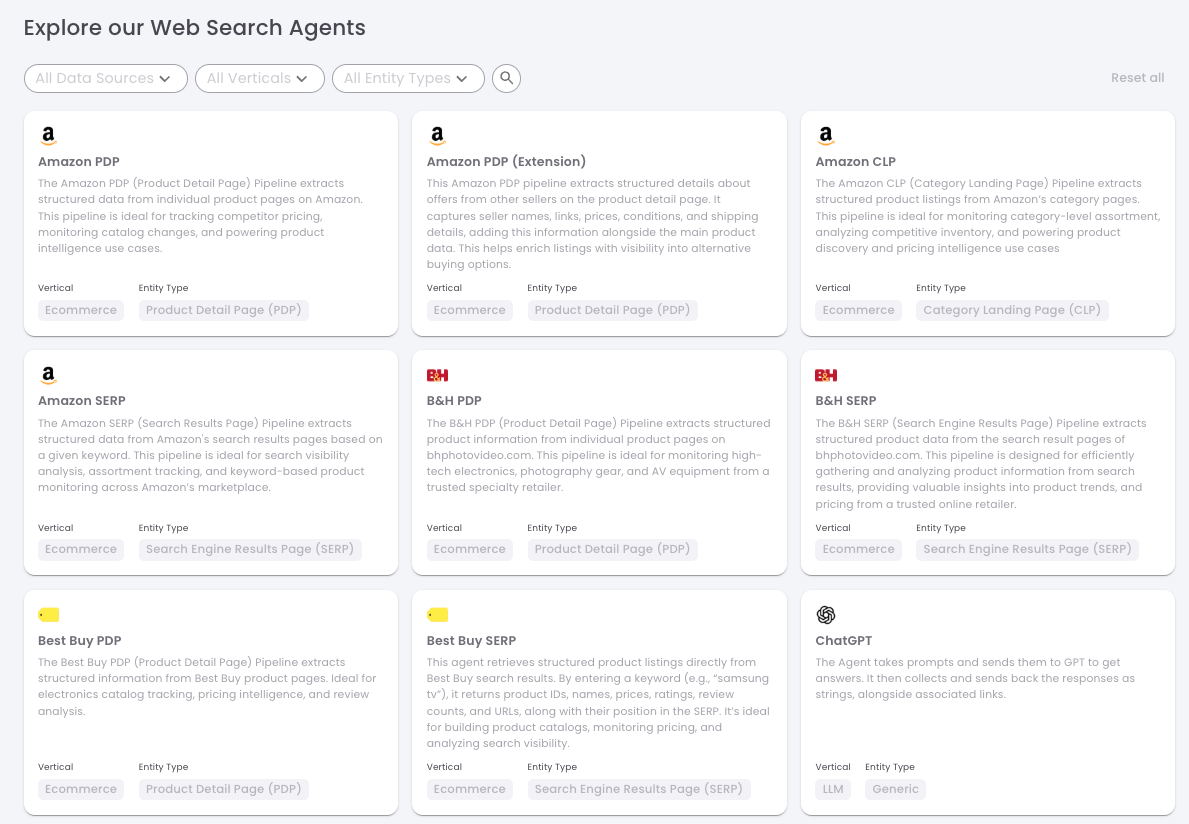
  1. Browse pre-built agents with visual previews and documentation
Image
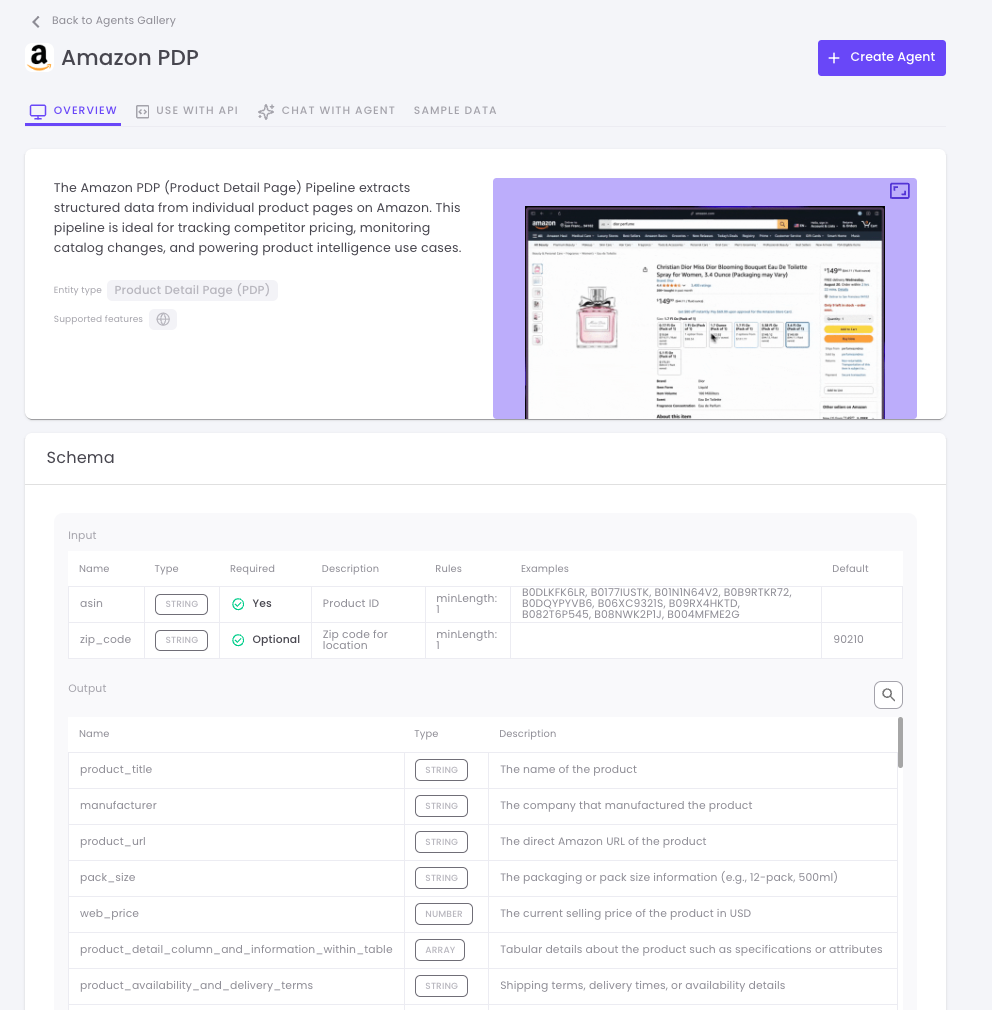
  1. Explore agent details including schemas, descriptions, and interactive demos
Image
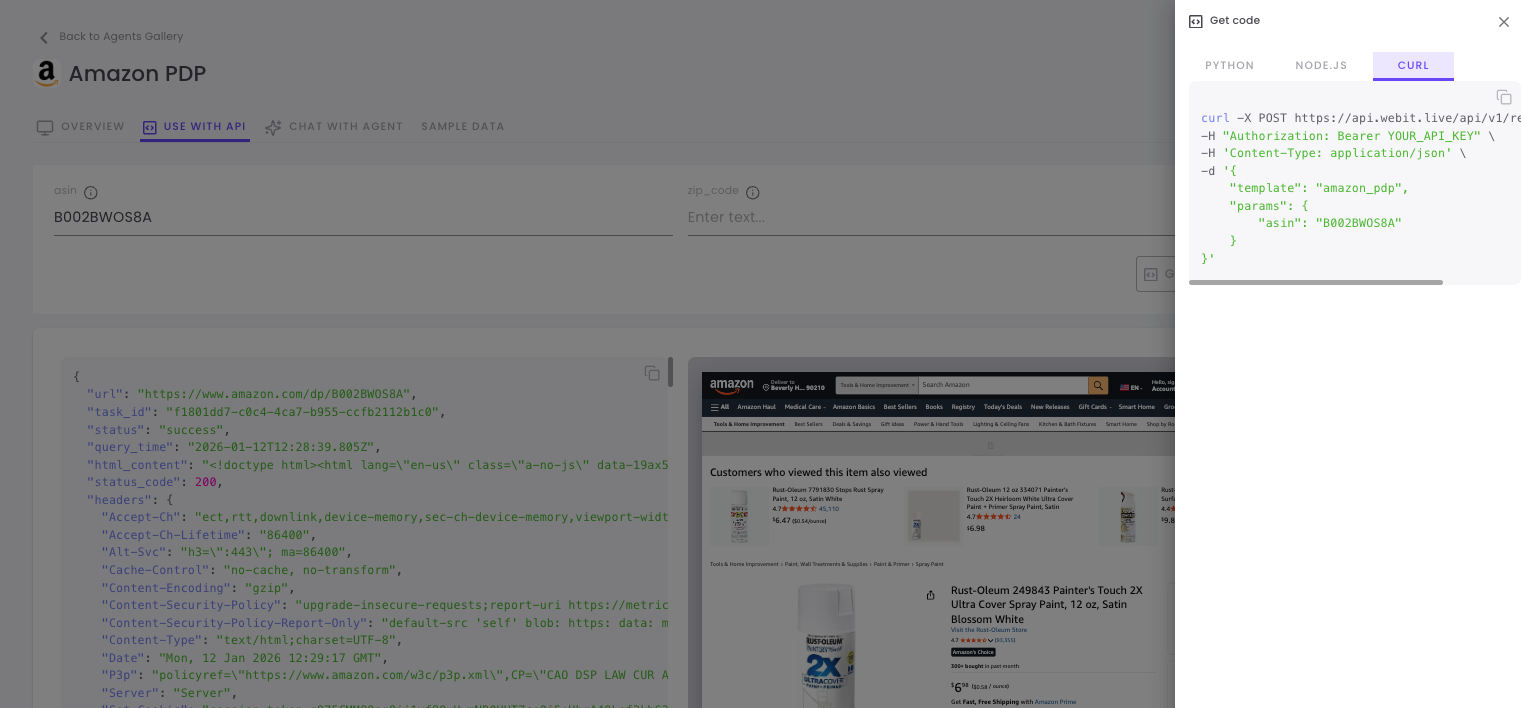
  1. Run a live test and export the validated code snippet to your development environment
Image

Via API

Programmatically discover and inspect agents for automation and integration.

List Agents API

Browse and search the agent catalog.
GET https://sdk.nimbleway.com/v1/agents

Parameters

ParameterTypeDescriptionRequired
privacyEnumFilter by privacy level (all, public, private)No
offsetIntegerPagination offset (default: 0)No
limitIntegerNumber of results per page (default: 100)No

Response Schema

Each agent in the response contains:
FieldTypeDescription
namestringUnique agent identifier (use this in API calls)
display_namestringHuman-readable agent name
descriptionstringWhat the agent does
is_publicbooleanWhether the agent is maintained by Nimble
verticalstringIndustry vertical (e.g., “Ecommerce”, “Search”)
entity_typestringPage type (e.g., “Product Detail Page”, “SERP”)
domainstringTarget website domain

Usage Examples

from nimble_sdk import NimbleClient

client = NimbleClient(api_key="YOUR-API-KEY")

# List all public agents
agents = client.agents.list(privacy="public")

for agent in agents:
    print(f"{agent['name']}: {agent['display_name']}")
    print(f"  Domain: {agent['domain']}")
    print(f"  Vertical: {agent['vertical']}")
    print(f"  Type: {agent['entity_type']}")

Response Example

[
  {
    "name": "amazon_pdp",
    "is_public": true,
    "display_name": "Amazon Product Page",
    "description": "Extract structured data from Amazon product detail pages including pricing, reviews, specifications, and availability.",
    "vertical": "Ecommerce",
    "entity_type": "Product Detail Page (PDP)",
    "domain": "www.amazon.com"
  },
  {
    "name": "amazon_serp",
    "is_public": true,
    "display_name": "Amazon Search Results",
    "description": "Extract product listings from Amazon search results pages based on a keyword query.",
    "vertical": "Ecommerce",
    "entity_type": "Search Engine Results Page (SERP)",
    "domain": "www.amazon.com"
  },
  {
    "name": "walmart_pdp",
    "is_public": true,
    "display_name": "Walmart Product Page",
    "description": "Extract structured data from Walmart product detail pages including pricing, reviews, and variants.",
    "vertical": "Ecommerce",
    "entity_type": "Product Detail Page (PDP)",
    "domain": "www.walmart.com"
  },
  {
    "name": "google_search",
    "is_public": true,
    "display_name": "Google Search Results",
    "description": "Extract structured data from Google Search Results Pages (SERPs) including organic results, ads, and featured snippets.",
    "vertical": "Search Engine",
    "entity_type": "Search Engine Results Page (SERP)",
    "domain": "www.google.com"
  }
]

Get Agent Details API

Get comprehensive information about a specific agent, including input parameters and output schema.
GET https://sdk.nimbleway.com/v1/agents/{agent_name}

Parameters

ParameterTypeDescriptionRequired
agent_namestringThe agent name (e.g., amazon_pdp)Yes

Response Schema

FieldTypeDescription
namestringUnique agent identifier
display_namestringHuman-readable agent name
descriptionstringWhat the agent does
is_publicbooleanWhether maintained by Nimble
verticalstringIndustry vertical
entity_typestringPage type
domainstringTarget website domain
input_propertiesarrayInput parameters for the agent (see below)
output_schemaobjectJSON schema describing output fields
feature_flagsobjectSupported capabilities (localization, pagination)

Input Properties

Each item in input_properties contains:
FieldTypeDescription
namestringParameter name
typestringData type (string, number, boolean)
descriptionstringWhat the parameter does
requiredbooleanWhether the parameter is required
defaultstringDefault value if not provided
examplesarrayExample values
rulesarrayValidation rules

Feature Flags

FlagTypeDescription
is_localization_supportedbooleanSupports ZIP code for location-specific data
is_pagination_supportedbooleanSupports paginated results

Usage Examples

from nimble_sdk import NimbleClient

client = NimbleClient(api_key="YOUR-API-KEY")

# Get agent details
agent = client.agents.get("amazon_pdp")

print(f"Agent: {agent['display_name']}")
print(f"Description: {agent['description']}")
print(f"Domain: {agent['domain']}")

# Check feature flags
flags = agent['feature_flags']
print(f"\nCapabilities:")
print(f"  Localization: {'Yes' if flags['is_localization_supported'] else 'No'}")
print(f"  Pagination: {'Yes' if flags['is_pagination_supported'] else 'No'}")

# List input parameters
print(f"\nInput Parameters:")
for param in agent['input_properties']:
    required = "required" if param['required'] else "optional"
    print(f"  {param['name']} ({param['type']}) - {required}")
    print(f"    {param['description']}")
    if param.get('examples'):
        print(f"    Examples: {', '.join(param['examples'])}")

Response Example

{
  "name": "amazon_pdp",
  "is_public": true,
  "display_name": "Amazon Product Page",
  "description": "Extract structured data from Amazon product detail pages including pricing, reviews, specifications, variants, and availability.",
  "vertical": "Ecommerce",
  "entity_type": "Product Detail Page (PDP)",
  "domain": "www.amazon.com",
  "input_properties": [
    {
      "name": "asin",
      "required": true,
      "type": "string",
      "description": "Amazon Standard Identification Number (ASIN) - the unique 10-character product identifier",
      "rules": ["Must be exactly 10 alphanumeric characters"],
      "examples": ["B08N5WRWNW", "B0DLKFK6LR"],
      "default": null
    },
    {
      "name": "zip_code",
      "required": false,
      "type": "string",
      "description": "ZIP code for location-specific pricing and availability",
      "rules": ["5-digit US ZIP code"],
      "examples": ["90210", "10001"],
      "default": "90210"
    }
  ],
  "output_schema": {
    "asin": { "type": "string", "description": "Product ASIN" },
    "product_title": { "type": "string", "description": "Full product name" },
    "brand": { "type": "string", "description": "Product brand" },
    "web_price": { "type": "number", "description": "Current selling price" },
    "list_price": { "type": "number", "description": "Original price before discount" },
    "average_of_reviews": { "type": "number", "description": "Average rating (0-5)" },
    "number_of_reviews": { "type": "number", "description": "Total review count" },
    "availability": { "type": "boolean", "description": "Whether in stock" },
    "image_url": { "type": "string", "description": "Main product image URL" }
  },
  "feature_flags": {
    "is_localization_supported": true,
    "is_pagination_supported": false
  }
}

Available Agents by Vertical

E-commerce

AgentDisplay NameDomainLocalizationPagination
amazon_pdpAmazon Product Pagewww.amazon.comYesNo
amazon_serpAmazon Searchwww.amazon.comYesYes
amazon_categoryAmazon Categorywww.amazon.comNoYes
walmart_pdpWalmart Product Pagewww.walmart.comYesNo
walmart_searchWalmart Searchwww.walmart.comYesYes
target_pdpTarget Product Pagewww.target.comYesNo
best_buy_pdpBest Buy Productwww.bestbuy.comYesNo
home_depot_pdpHome Depot Productwww.homedepot.comYesNo

Search Engines

AgentDisplay NameDomainLocalizationPagination
google_searchGoogle Search Resultswww.google.comYesYes
google_maps_searchGoogle Maps Searchmaps.google.comYesYes
google_search_aioGoogle AI Overviewwww.google.comYesNo

Social Media

AgentDisplay NameDomainLocalizationPagination
tiktok_accountTikTok Accountwww.tiktok.comNoYes
facebook_pageFacebook Pagewww.facebook.comNoNo
youtube_shortsYouTube Shortswww.youtube.comNoYes

LLM Platforms

AgentDisplay NameDomainLocalizationPagination
chatgptChatGPT Responseschatgpt.comNoNo
geminiGemini Responsesgemini.google.comNoNo
perplexityPerplexitywww.perplexity.aiNoNo
grokGrok Responsesgrok.comNoNo

Common Patterns

Filter Agents by Vertical

Find all agents for a specific industry:
from nimble_sdk import NimbleClient

client = NimbleClient(api_key="YOUR-API-KEY")

# Get all agents
agents = client.agents.list(privacy="public")

# Filter by vertical
ecommerce_agents = [
    agent for agent in agents
    if agent.get('vertical') == 'Ecommerce'
]

print(f"Found {len(ecommerce_agents)} e-commerce agents:")
for agent in ecommerce_agents:
    print(f"  {agent['name']}: {agent['display_name']} ({agent['domain']})")

Check Localization Support

Verify an agent supports location-specific data:
from nimble_sdk import NimbleClient

client = NimbleClient(api_key="YOUR-API-KEY")

agent = client.agents.get("amazon_pdp")

if agent['feature_flags']['is_localization_supported']:
    print("This agent supports localization!")
    print("Pass zip_code parameter for location-specific pricing.")
else:
    print("This agent does not support localization.")

Get Required Parameters

Find which parameters are required before calling an agent:
from nimble_sdk import NimbleClient

client = NimbleClient(api_key="YOUR-API-KEY")

agent = client.agents.get("amazon_pdp")

required_params = [
    p for p in agent['input_properties']
    if p['required']
]

optional_params = [
    p for p in agent['input_properties']
    if not p['required']
]

print("Required parameters:")
for p in required_params:
    examples = ', '.join(p.get('examples', []))
    print(f"  {p['name']}: {p['description']}")
    if examples:
        print(f"    Examples: {examples}")

print("\nOptional parameters:")
for p in optional_params:
    default = p.get('default', 'none')
    print(f"  {p['name']}: {p['description']} (default: {default})")

Validate Parameters Before Calling

Check parameters match the expected schema:
from nimble_sdk import NimbleClient

client = NimbleClient(api_key="YOUR-API-KEY")

def validate_params(agent_name, params):
    """Validate params against agent input_properties"""
    agent = client.agents.get(agent_name)
    errors = []

    # Build lookup of input properties
    props = {p['name']: p for p in agent['input_properties']}

    # Check required fields
    for prop_name, prop in props.items():
        if prop['required'] and prop_name not in params:
            errors.append(f"Missing required parameter: {prop_name}")

    # Check for unknown parameters
    for param_name in params:
        if param_name not in props:
            errors.append(f"Unknown parameter: {param_name}")

    return errors

# Validate before calling
errors = validate_params("amazon_pdp", {"asin": "B08N5WRWNW"})

if errors:
    print("Validation errors:")
    for error in errors:
        print(f"  - {error}")
else:
    print("Parameters are valid!")

Next Steps