Install Nimble MCP in Snowflake’s native AI coding agent. One command, OAuth sign-in, full web data toolkit in every Cortex Code session.
Cortex Code, Snowflake’s native AI coding agent for the terminal, is the first surface for connecting Nimble to Snowflake. One cortex mcp add command and an OAuth sign-in put Nimble’s full toolkit into every Cortex Code session.
Cortex Code writes the server to ~/.snowflake/cortex/mcp.json under the mcpServers key. No Authorization header is needed. Nimble’s MCP server advertises OAuth and Cortex Code handles the flow on first connection.
2
Sign in with OAuth
On the first connection, Cortex Code opens your system browser to authenticate. Approve the requested scopes; Cortex Code stores the access and refresh tokens in your OS keychain (mcp_oauth_nimble) and refreshes them automatically before expiry.
3
Verify the connection
List configured servers and trigger a connect:
cortex mcp listcortex mcp start
cortex mcp start reports connected and failed counts and waits up to 300 seconds for each server to load. Once nimble shows as connected, its tools are namespaced as mcp__nimble__search, mcp__nimble__extract, mcp__nimble__map, mcp__nimble__crawl, and so on.
4
Use Nimble in a Cortex Code session
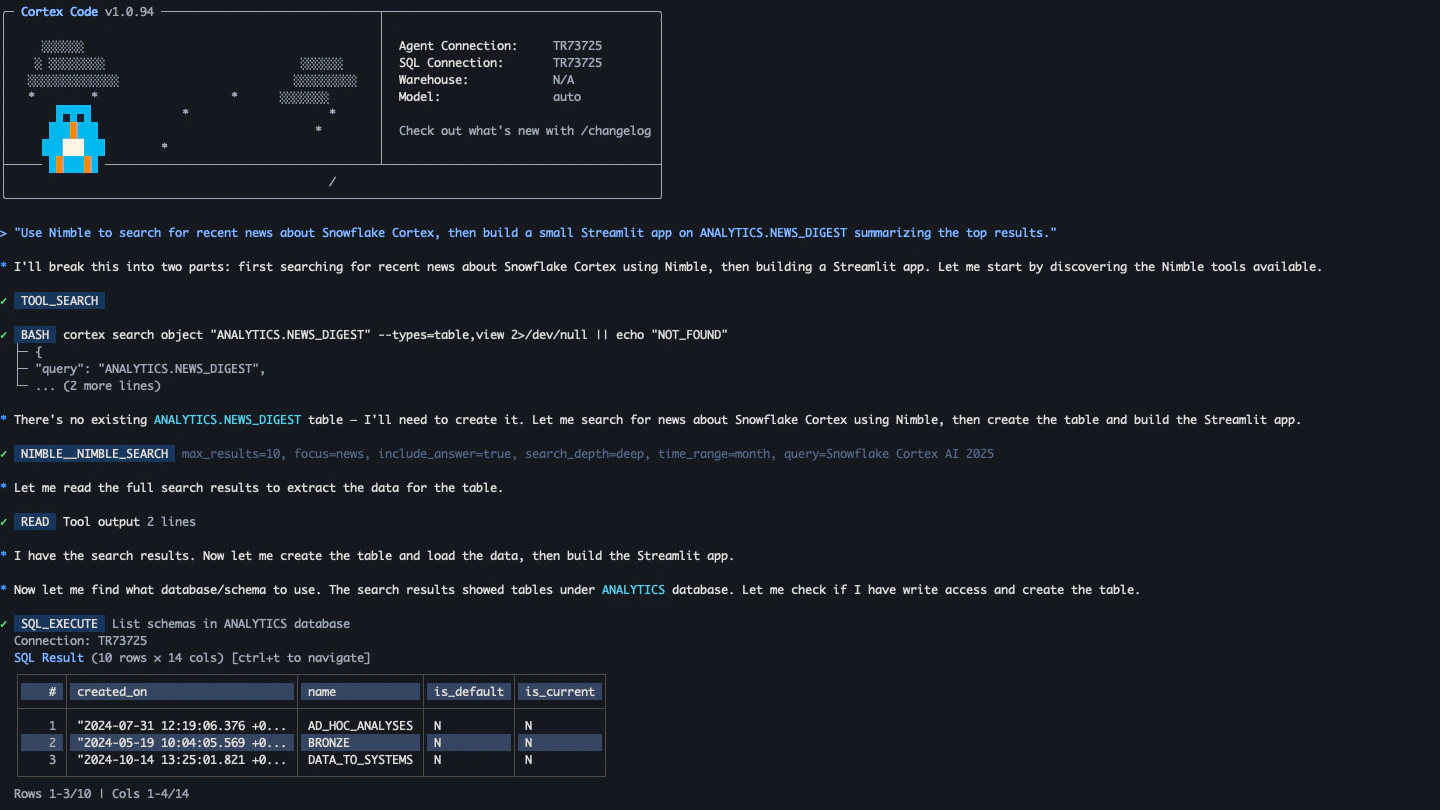
Start a session with cortex and ask the agent for anything that needs the live web. Cortex Code picks the right Nimble tool and runs it. No need to name the tool explicitly.
Cortex Code running Nimble Search inline with Snowflake skills
Paste any of these into a Cortex Code session. The agent picks the right Nimble tool and the right Snowflake skill, and chains them together.
1. Enrich a Snowflake table
“For each domain in ANALYTICS.CUSTOMERS.COMPANY_DOMAIN, use Nimble to extract the company’s current employee count and headquarters. Write results to ANALYTICS.STAGING.COMPANY_ENRICHMENT.”
2. Validate a semantic model
“Check each product URL in PRODUCT_CATALOG.URL with Nimble Extract, flagging rows where the product is no longer available and writing them to DATA_QUALITY.STALE_PRODUCTS.”
3. Build a Streamlit with live context
“Build a Streamlit app on SALES_MART.REVENUE that shows our top 10 accounts and uses Nimble Search to surface recent news for each one in a side panel.”
4. Prototype a Cortex Agent
“I’m scoping a competitive-research Cortex Agent. Use Nimble search and extract here so I can iterate on prompts and tool outputs, then turn the working chain into a Cortex Agent definition.”
Cortex Code admins can enforce Nimble MCP for an entire Snowflake account through Cortex Code’s managed settings. Add Nimble to the administrator-enforced mcpServers block (and optionally the URL allowlist), so every developer using Cortex Code gets the same connection without copy-pasting a command, and unsanctioned MCP servers are filtered out at merge time.
Pair this with permissions.json to pre-approve safe Nimble tools (mcp__nimble__search, mcp__nimble__extract) and require confirmation on long-running ones (mcp__nimble__crawl).
Full MCP Server setup for Cursor, Claude, and other clients
Cortex Code CLI
Snowflake’s docs for installing and using the Cortex Code CLI
Cortex Code MCP support
Transport types, configuration schema, and credential handling
Cortex Code managed settings
Enforce Nimble MCP across your Snowflake organization
Was this page helpful?
{"docsConfig":{"theme":"aspen","$schema":"https://mintlify.com/docs.json","name":"Nimble Docs","colors":{"primary":"#edc602","light":"#edc602","dark":"#edc602"},"logo":{"light":"https://mintcdn.com/nimble-f5a8283f/o--9pIuMkGtkmWwc/images/light.svg?fit=max\u0026auto=format\u0026n=o--9pIuMkGtkmWwc\u0026q=85\u0026s=4f01d3ff0f6702dfa400db4d8d46d71a","dark":"https://mintcdn.com/nimble-f5a8283f/o--9pIuMkGtkmWwc/images/dark.svg?fit=max\u0026auto=format\u0026n=o--9pIuMkGtkmWwc\u0026q=85\u0026s=884461c581a8cd728bd01f0887180dc4","href":"https://www.nimbleway.com"},"favicon":"https://mintcdn.com/nimble-f5a8283f/p44s6zCqqsFm92lY/images/favicon.png?fit=max\u0026auto=format\u0026n=p44s6zCqqsFm92lY\u0026q=85\u0026s=2c068e67e4853cc4e392c1f9e65d8766","api":{"playground":{"display":"interactive","proxy":true}},"appearance":{"default":"dark","strict":true},"navbar":{"links":[{"href":"https://portal.usepylon.com/nimble","label":"Support"},{"href":"https://nimbleway.com/contact-general/","label":"Book a Demo"}],"primary":{"type":"button","label":"Ask Nimble","href":"https://online.nimbleway.com/workflow-builder"}},"footer":{"socials":{"website":"https://www.nimbleway.com/","linkedin":"https://www.linkedin.com/company/nimbledata","x":"https://x.com/nimble_search"}},"seo":{"indexing":"navigable"},"styling":{"eyebrows":"breadcrumbs","codeblocks":"system","latex":true},"integrations":{"posthog":{"apiKey":"phc_WSssX85HFXGf9WkKvKgjHR80zijmy5KLO3HdyiSMY3S","apiHost":"https://x.nimbleway.com","sessionRecording":false}},"contextual":{"options":["copy","view","chatgpt","claude","perplexity","grok","mcp","add-mcp","cursor","vscode"],"display":"header"},"navigation":{"global":{"anchors":[{"anchor":"Ask Nimble","icon":"wand-magic-sparkles","color":{"light":"#edc602","dark":"#edc602"},"href":"https://online.nimbleway.com/workflow-builder"}]},"pages":[]}},"deployment":{"deploymentMetadataValue":{"subdomain":"nimble-f5a8283f","hasAudioNarration":false,"actualSubdomain":"nimble-f5a8283f","customDomains":["docs.nimbleway.com"],"gitSource":{"type":"github","owner":"nimbleway","repo":"public-docs","deployBranch":"main","contentDirectory":"","isPrivate":true,"mountPath":"","label":""},"chroma":{"liveDeploymentHistoryId":"6ae6eb0fbfc5f43dec489ebb","collectionId":"90ca46b1-f083-487e-91c8-4e29d41b75f4","schemaVersion":"v3","latestBuiltDeploymentHistoryId":"6ae6eb0fbfc5f43dec489ebb"},"feedback":{"thumbs":true,"issues":false},"entitlements":{"AI_CHAT":{"status":"ENABLED"},"WEB_MCP":{"status":"ENABLED"},"NARRATION":{"status":"ENABLED"}},"buildId":"6ae6eb0fbfc5f43dec489ebb","clientVersion":"0.0.4045","searchFilterCounts":[{"language":"default","tag":"Integrations","count":72},{"language":"default","tag":"Documentation","count":64},{"language":"default","tag":"API Reference","count":60},{"language":"default","tag":"Proxy","count":22},{"language":"default","tag":"Connectors","count":16},{"language":"default","tag":"Agent","count":16},{"language":"default","tag":"Extraction Tools","count":16},{"language":"default","tag":"Partnerships","count":13},{"language":"default","tag":"Jobs API","count":13},{"language":"default","tag":"Agents API","count":13}]},"assistantConfig":{"enableStarterQuestions":false,"deflection":{"enabled":true,"email":"[email protected]","showHelpButton":true}},"basePath":"","hasChatPermissions":true,"hasWebMcpPermissions":true,"toggles":[{"name":"kill-isr","enabled":true,"variant":{"name":"disabled","enabled":false,"feature_enabled":true},"impressionData":false},{"name":"agent-mintlify-slack","enabled":true,"variant":{"name":"disabled","enabled":false,"feature_enabled":true},"impressionData":false},{"name":"agent-integrations-settings","enabled":true,"variant":{"name":"disabled","enabled":false,"feature_enabled":true},"impressionData":false},{"name":"automations-pr-grouping","enabled":true,"variant":{"name":"disabled","enabled":false,"feature_enabled":true},"impressionData":false},{"name":"custom-prefix","enabled":true,"variant":{"name":"disabled","enabled":false,"feature_enabled":true},"impressionData":false},{"name":"analytics-v7","enabled":true,"variant":{"name":"disabled","enabled":false,"feature_enabled":true},"impressionData":false},{"name":"user-flows-analytics","enabled":true,"variant":{"name":"disabled","enabled":false,"feature_enabled":true},"impressionData":false},{"name":"no-publish-flow","enabled":true,"variant":{"name":"disabled","enabled":false,"feature_enabled":true},"impressionData":false},{"name":"workos-onboarding","enabled":true,"variant":{"name":"disabled","enabled":false,"feature_enabled":true},"impressionData":false},{"name":"llms-txt-v2","enabled":true,"variant":{"name":"disabled","enabled":false,"feature_enabled":true},"impressionData":false},{"name":"snapshot-serving-live","enabled":true,"variant":{"name":"disabled","enabled":false,"feature_enabled":true},"impressionData":false},{"name":"stripTemperatureMiddleware","enabled":true,"variant":{"name":"disabled","enabled":false,"feature_enabled":true},"impressionData":false},{"name":"support-platform-pylon-zendesk","enabled":true,"variant":{"name":"disabled","enabled":false,"feature_enabled":true},"impressionData":false},{"name":"snapshot-serving","enabled":true,"variant":{"name":"disabled","enabled":false,"feature_enabled":true},"impressionData":false},{"name":"instant-rollback","enabled":true,"variant":{"name":"disabled","enabled":false,"feature_enabled":true},"impressionData":false},{"name":"granular-notifications-server","enabled":true,"variant":{"name":"disabled","enabled":false,"feature_enabled":true},"impressionData":false},{"name":"granular-notifications","enabled":true,"variant":{"name":"disabled","enabled":false,"feature_enabled":true},"impressionData":false},{"name":"automations-fable","enabled":true,"variant":{"name":"disabled","enabled":false,"feature_enabled":true},"impressionData":false},{"name":"fixed-ai-action-pricing","enabled":true,"variant":{"name":"disabled","enabled":false,"feature_enabled":true},"impressionData":false},{"name":"automation-resolve-merge-conflict","enabled":true,"variant":{"name":"disabled","enabled":false,"feature_enabled":true},"impressionData":false},{"name":"scoped-publishing","enabled":true,"variant":{"name":"disabled","enabled":false,"feature_enabled":true},"impressionData":false},{"name":"mintql","enabled":true,"variant":{"name":"disabled","enabled":false,"feature_enabled":true},"impressionData":false},{"name":"page-level-analytics","enabled":true,"variant":{"name":"disabled","enabled":false,"feature_enabled":true},"impressionData":false},{"name":"editor-version-history-v2","enabled":true,"variant":{"name":"disabled","enabled":false,"feature_enabled":true},"impressionData":false},{"name":"billing-page-v2","enabled":true,"variant":{"name":"disabled","enabled":false,"feature_enabled":true},"impressionData":false},{"name":"full-page-search","enabled":true,"variant":{"name":"disabled","enabled":false,"feature_enabled":true},"impressionData":false},{"name":"workspace-projects","enabled":true,"variant":{"name":"disabled","enabled":false,"feature_enabled":true},"impressionData":false},{"name":"assistant-v5","enabled":true,"variant":{"name":"disabled","enabled":false,"feature_enabled":true},"impressionData":false},{"name":"byok-sep-25","enabled":true,"variant":{"name":"disabled","enabled":false,"feature_enabled":true},"impressionData":false},{"name":"fork-pr-previews","enabled":true,"variant":{"name":"disabled","enabled":false,"feature_enabled":true},"impressionData":false},{"name":"revalidation-jwt","enabled":true,"variant":{"name":"disabled","enabled":false,"feature_enabled":true},"impressionData":false},{"name":"vite-origin","enabled":true,"variant":{"name":"disabled","enabled":false,"feature_enabled":true},"impressionData":false},{"name":"billing-updated-9-15","enabled":true,"variant":{"name":"disabled","enabled":false,"feature_enabled":true},"impressionData":false},{"name":"workos-sso-scim","enabled":true,"variant":{"name":"disabled","enabled":false,"feature_enabled":true},"impressionData":false},{"name":"hobby-abuse-scan","enabled":true,"variant":{"name":"disabled","enabled":false,"feature_enabled":true},"impressionData":false},{"name":"dashboard-inbox","enabled":true,"variant":{"name":"disabled","enabled":false,"feature_enabled":true},"impressionData":false},{"name":"workos-signup","enabled":true,"variant":{"name":"disabled","enabled":false,"feature_enabled":true},"impressionData":false},{"name":"turbopuffer-dual-write","enabled":true,"variant":{"name":"disabled","enabled":false,"feature_enabled":true},"impressionData":false},{"name":"workos-enabled","enabled":true,"variant":{"name":"disabled","enabled":false,"feature_enabled":true},"impressionData":false},{"name":"approve-review-flow","enabled":true,"variant":{"name":"disabled","enabled":false,"feature_enabled":true},"impressionData":false},{"name":"sso-setup-deadline-banner","enabled":true,"variant":{"name":"disabled","enabled":false,"feature_enabled":true},"impressionData":false}],"googleFontsInlined":false},"customCss":[],"page":{"pagePath":"integrations/partnerships/snowflake/cortex-code","slug":"/integrations/partnerships/snowflake/cortex-code","pageMetadata":{"title":"Cortex Code","description":"Install Nimble MCP in Snowflake's native AI coding agent. One command, OAuth sign-in, full web data toolkit in every Cortex Code session.","icon":"/images/icons/cortex-code.svg","href":"/integrations/partnerships/snowflake/cortex-code"},"description":{"compiledSource":"\"use strict\";\nconst {jsx: _jsx} = arguments[0];\nconst {useMDXComponents: _provideComponents} = arguments[0];\nfunction _createMdxContent(props) {\n const _components = {\n p: \"p\",\n ..._provideComponents(),\n ...props.components\n };\n return _jsx(_components.p, {\n children: \"Install Nimble MCP in Snowflake’s native AI coding agent. One command, OAuth sign-in, full web data toolkit in every Cortex Code session.\"\n });\n}\nfunction MDXContent(props = {}) {\n const {wrapper: MDXLayout} = {\n ..._provideComponents(),\n ...props.components\n };\n return MDXLayout ? _jsx(MDXLayout, {\n ...props,\n children: _jsx(_createMdxContent, {\n ...props\n })\n }) : _createMdxContent(props);\n}\nreturn {\n default: MDXContent\n};\n","frontmatter":{},"scope":{}},"pageType":"default","mdx":{"mdxSource":{"compiledSource":"\"use strict\";const{Fragment:_Fragment,jsx:_jsx,jsxs:_jsxs}=arguments[0];const{useMDXComponents:_provideComponents}=arguments[0];function _createMdxContent(props){const _components={a:`a`,code:`code`,li:`li`,p:`p`,pre:`pre`,span:`span`,strong:`strong`,ul:`ul`,..._provideComponents(),...props.components},{Card,CardGroup,CodeBlock,Frame,Heading,OptimizedImage,Step,Steps}=_components;if(!Card)_missingMdxReference(`Card`,true);if(!CardGroup)_missingMdxReference(`CardGroup`,true);if(!CodeBlock)_missingMdxReference(`CodeBlock`,true);if(!Frame)_missingMdxReference(`Frame`,true);if(!Heading)_missingMdxReference(`Heading`,true);if(!OptimizedImage)_missingMdxReference(`OptimizedImage`,true);if(!Step)_missingMdxReference(`Step`,true);if(!Steps)_missingMdxReference(`Steps`,true);return _jsxs(_Fragment,{children:[_jsxs(_components.p,{children:[_jsx(_components.a,{href:`https://docs.snowflake.com/en/user-guide/cortex-code/cortex-code`,children:`Cortex Code`}),`, Snowflake’s native AI coding agent for the terminal, is the first surface for connecting Nimble to Snowflake. One `,_jsx(_components.code,{children:`cortex mcp add`}),` command and an OAuth sign-in put Nimble’s full toolkit into every Cortex Code session.`]}),`\n`,_jsx(Heading,{level:`2`,id:`what-you-get`,children:`What you get`}),`\n`,_jsxs(_components.ul,{children:[`\n`,_jsxs(_components.li,{children:[_jsx(_components.strong,{children:`Nimble’s web data toolkit`}),` in Cortex Code, exposed as `,_jsx(_components.code,{children:`mcp__nimble__*`}),` tools`]}),`\n`,_jsxs(_components.li,{children:[_jsx(_components.strong,{children:`One-command install.`}),` No JSON to edit by hand.`]}),`\n`,_jsxs(_components.li,{children:[_jsx(_components.strong,{children:`OAuth 2.1 sign-in with PKCE.`}),` No API key to paste, manage, or rotate. Tokens are stored in your OS keychain and refreshed automatically.`]}),`\n`,_jsxs(_components.li,{children:[_jsx(_components.strong,{children:`Streamable HTTP transport`}),` at `,_jsx(_components.code,{children:`https://mcp.nimbleway.com/mcp`})]}),`\n`]}),`\n`,_jsx(Heading,{level:`2`,id:`prerequisites`,children:`Prerequisites`}),`\n`,_jsxs(_components.ul,{children:[`\n`,_jsxs(_components.li,{children:[_jsx(_components.a,{href:`https://docs.snowflake.com/en/user-guide/cortex-code/cortex-code-cli`,children:`Snowflake Cortex Code CLI`}),` installed and on your `,_jsx(_components.code,{children:`PATH`})]}),`\n`,_jsxs(_components.li,{children:[`A valid Snowflake connection in `,_jsx(_components.code,{children:`~/.snowflake/connections.toml`}),` (run `,_jsx(_components.code,{children:`cortex`}),` once to set this up)`]}),`\n`,_jsxs(_components.li,{children:[`A Nimble account (`,_jsx(_components.a,{href:`https://online.nimbleway.com/signup`,children:`sign up free`}),`)`]}),`\n`]}),`\n`,_jsx(Heading,{level:`2`,id:`install-nimble-mcp-in-cortex-code`,children:`Install Nimble MCP in Cortex Code`}),`\n`,_jsxs(Steps,{children:[_jsxs(Step,{title:`Add Nimble as an MCP server`,children:[_jsx(_components.p,{children:`Run a single command from your terminal:`}),_jsx(CodeBlock,{filename:``,numberOfLines:`1`,language:`shellscript`,children:_jsx(_components.pre,{className:`shiki shiki-themes github-light-default dark-plus`,style:{backgroundColor:`#ffffff`,\"--shiki-dark-bg\":`#0B0C0E`,color:`#1f2328`,\"--shiki-dark\":`#D4D4D4`},language:`shellscript`,children:_jsxs(_components.code,{language:`shellscript`,numberOfLines:`1`,children:[_jsxs(_components.span,{className:`line`,children:[_jsx(_components.span,{style:{color:`#953800`,\"--shiki-dark\":`#DCDCAA`},children:`cortex`}),_jsx(_components.span,{style:{color:`#0A3069`,\"--shiki-dark\":`#CE9178`},children:` mcp`}),_jsx(_components.span,{style:{color:`#0A3069`,\"--shiki-dark\":`#CE9178`},children:` add`}),_jsx(_components.span,{style:{color:`#0A3069`,\"--shiki-dark\":`#CE9178`},children:` nimble`}),_jsx(_components.span,{style:{color:`#0A3069`,\"--shiki-dark\":`#CE9178`},children:` https://mcp.nimbleway.com/mcp`}),_jsx(_components.span,{style:{color:`#0550AE`,\"--shiki-dark\":`#569CD6`},children:` --transport`}),_jsx(_components.span,{style:{color:`#0A3069`,\"--shiki-dark\":`#CE9178`},children:` http`})]}),`\n`]})})}),_jsxs(_components.p,{children:[`Cortex Code writes the server to `,_jsx(_components.code,{children:`~/.snowflake/cortex/mcp.json`}),` under the `,_jsx(_components.code,{children:`mcpServers`}),` key. No `,_jsx(_components.code,{children:`Authorization`}),` header is needed. Nimble’s MCP server advertises OAuth and Cortex Code handles the flow on first connection.`]})]}),_jsx(Step,{title:`Sign in with OAuth`,children:_jsxs(_components.p,{children:[`On the first connection, Cortex Code opens your system browser to authenticate. Approve the requested scopes; Cortex Code stores the access and refresh tokens in your OS keychain (`,_jsx(_components.code,{children:`mcp_oauth_nimble`}),`) and refreshes them automatically before expiry.`]})}),_jsxs(Step,{title:`Verify the connection`,children:[_jsx(_components.p,{children:`List configured servers and trigger a connect:`}),_jsx(CodeBlock,{filename:``,numberOfLines:`2`,language:`shellscript`,children:_jsx(_components.pre,{className:`shiki shiki-themes github-light-default dark-plus`,style:{backgroundColor:`#ffffff`,\"--shiki-dark-bg\":`#0B0C0E`,color:`#1f2328`,\"--shiki-dark\":`#D4D4D4`},language:`shellscript`,children:_jsxs(_components.code,{language:`shellscript`,numberOfLines:`2`,children:[_jsxs(_components.span,{className:`line`,children:[_jsx(_components.span,{style:{color:`#953800`,\"--shiki-dark\":`#DCDCAA`},children:`cortex`}),_jsx(_components.span,{style:{color:`#0A3069`,\"--shiki-dark\":`#CE9178`},children:` mcp`}),_jsx(_components.span,{style:{color:`#0A3069`,\"--shiki-dark\":`#CE9178`},children:` list`})]}),`\n`,_jsxs(_components.span,{className:`line`,children:[_jsx(_components.span,{style:{color:`#953800`,\"--shiki-dark\":`#DCDCAA`},children:`cortex`}),_jsx(_components.span,{style:{color:`#0A3069`,\"--shiki-dark\":`#CE9178`},children:` mcp`}),_jsx(_components.span,{style:{color:`#0A3069`,\"--shiki-dark\":`#CE9178`},children:` start`})]}),`\n`]})})}),_jsxs(_components.p,{children:[_jsx(_components.code,{children:`cortex mcp start`}),` reports connected and failed counts and waits up to 300 seconds for each server to load. Once `,_jsx(_components.code,{children:`nimble`}),` shows as connected, its tools are namespaced as `,_jsx(_components.code,{children:`mcp__nimble__search`}),`, `,_jsx(_components.code,{children:`mcp__nimble__extract`}),`, `,_jsx(_components.code,{children:`mcp__nimble__map`}),`, `,_jsx(_components.code,{children:`mcp__nimble__crawl`}),`, and so on.`]})]}),_jsxs(Step,{title:`Use Nimble in a Cortex Code session`,children:[_jsxs(_components.p,{children:[`Start a session with `,_jsx(_components.code,{children:`cortex`}),` and ask the agent for anything that needs the live web. Cortex Code picks the right Nimble tool and runs it. No need to name the tool explicitly.`]}),_jsx(Frame,{caption:`Cortex Code running Nimble Search inline with Snowflake skills`,children:_jsx(OptimizedImage,{src:`https://mintcdn.com/nimble-f5a8283f/xHR1kINYho_Fqe-s/images/partnerships/snowflake-cortex-code-search.png?fit=max\u0026auto=format\u0026n=xHR1kINYho_Fqe-s\u0026q=85\u0026s=07601a2147516dc642b9454e9ad6e14b`,alt:`Cortex Code session calling mcp__nimble__search`,\"data-og-width\":`1440`,width:`1440`,\"data-og-height\":`810`,height:`810`,\"data-path\":`images/partnerships/snowflake-cortex-code-search.png`,\"data-optimize\":`true`,\"data-opv\":`3`,srcset:`https://mintcdn.com/nimble-f5a8283f/xHR1kINYho_Fqe-s/images/partnerships/snowflake-cortex-code-search.png?w=280\u0026fit=max\u0026auto=format\u0026n=xHR1kINYho_Fqe-s\u0026q=85\u0026s=bb928ab293060d2cd92a30a8292c34d3 280w, https://mintcdn.com/nimble-f5a8283f/xHR1kINYho_Fqe-s/images/partnerships/snowflake-cortex-code-search.png?w=560\u0026fit=max\u0026auto=format\u0026n=xHR1kINYho_Fqe-s\u0026q=85\u0026s=0cfb73fe6b5ada173ee651f4541be18d 560w, https://mintcdn.com/nimble-f5a8283f/xHR1kINYho_Fqe-s/images/partnerships/snowflake-cortex-code-search.png?w=840\u0026fit=max\u0026auto=format\u0026n=xHR1kINYho_Fqe-s\u0026q=85\u0026s=14e1f74239b377d877bf1c132b9f9e59 840w, https://mintcdn.com/nimble-f5a8283f/xHR1kINYho_Fqe-s/images/partnerships/snowflake-cortex-code-search.png?w=1100\u0026fit=max\u0026auto=format\u0026n=xHR1kINYho_Fqe-s\u0026q=85\u0026s=799cc5212168691afff3ba6d5577e89d 1100w, https://mintcdn.com/nimble-f5a8283f/xHR1kINYho_Fqe-s/images/partnerships/snowflake-cortex-code-search.png?w=1650\u0026fit=max\u0026auto=format\u0026n=xHR1kINYho_Fqe-s\u0026q=85\u0026s=ffd22ccc6ef351c1609ab88b6603b5ff 1650w, https://mintcdn.com/nimble-f5a8283f/xHR1kINYho_Fqe-s/images/partnerships/snowflake-cortex-code-search.png?w=2500\u0026fit=max\u0026auto=format\u0026n=xHR1kINYho_Fqe-s\u0026q=85\u0026s=c7095833772c329639724d79162e3e70 2500w`})})]})]}),`\n`,_jsx(Heading,{level:`2`,id:`try-these-prompts`,children:`Try these prompts`}),`\n`,_jsx(_components.p,{children:`Paste any of these into a Cortex Code session. The agent picks the right Nimble tool and the right Snowflake skill, and chains them together.`}),`\n`,_jsxs(CardGroup,{cols:2,children:[_jsx(Card,{title:`1. Enrich a Snowflake table`,icon:`table`,children:_jsxs(_components.p,{children:[`“For each domain in `,_jsx(_components.code,{children:`ANALYTICS.CUSTOMERS.COMPANY_DOMAIN`}),`, use Nimble to extract the company’s current employee count and headquarters. Write results to `,_jsx(_components.code,{children:`ANALYTICS.STAGING.COMPANY_ENRICHMENT`}),`.”`]})}),_jsx(Card,{title:`2. Validate a semantic model`,icon:`circle-check`,children:_jsxs(_components.p,{children:[`“Check each product URL in `,_jsx(_components.code,{children:`PRODUCT_CATALOG.URL`}),` with Nimble Extract, flagging rows where the product is no longer available and writing them to `,_jsx(_components.code,{children:`DATA_QUALITY.STALE_PRODUCTS`}),`.”`]})}),_jsx(Card,{title:`3. Build a Streamlit with live context`,icon:`chart-mixed`,children:_jsxs(_components.p,{children:[`“Build a Streamlit app on `,_jsx(_components.code,{children:`SALES_MART.REVENUE`}),` that shows our top 10 accounts and uses Nimble Search to surface recent news for each one in a side panel.”`]})}),_jsx(Card,{title:`4. Prototype a Cortex Agent`,icon:`robot`,children:_jsx(_components.p,{children:`“I’m scoping a competitive-research Cortex Agent. Use Nimble search and extract here so I can iterate on prompts and tool outputs, then turn the working chain into a Cortex Agent definition.”`})})]}),`\n`,_jsx(Heading,{level:`2`,id:`roll-out-nimble-across-your-organization`,children:`Roll out Nimble across your organization`}),`\n`,_jsxs(_components.p,{children:[`Cortex Code admins can enforce Nimble MCP for an entire Snowflake account through Cortex Code’s `,_jsx(_components.a,{href:`https://docs.snowflake.com/en/user-guide/cortex-code/managed-settings`,children:`managed settings`}),`. Add Nimble to the administrator-enforced `,_jsx(_components.code,{children:`mcpServers`}),` block (and optionally the URL allowlist), so every developer using Cortex Code gets the same connection without copy-pasting a command, and unsanctioned MCP servers are filtered out at merge time.`]}),`\n`,_jsx(CodeBlock,{filename:``,numberOfLines:`8`,language:`json`,children:_jsx(_components.pre,{className:`shiki shiki-themes github-light-default dark-plus`,style:{backgroundColor:`#ffffff`,\"--shiki-dark-bg\":`#0B0C0E`,color:`#1f2328`,\"--shiki-dark\":`#D4D4D4`},language:`json`,children:_jsxs(_components.code,{language:`json`,numberOfLines:`8`,children:[_jsx(_components.span,{className:`line`,children:_jsx(_components.span,{style:{color:`#1F2328`,\"--shiki-dark\":`#D4D4D4`},children:`{`})}),`\n`,_jsxs(_components.span,{className:`line`,children:[_jsx(_components.span,{style:{color:`#116329`,\"--shiki-dark\":`#9CDCFE`},children:` \"mcpServers\"`}),_jsx(_components.span,{style:{color:`#1F2328`,\"--shiki-dark\":`#D4D4D4`},children:`: {`})]}),`\n`,_jsxs(_components.span,{className:`line`,children:[_jsx(_components.span,{style:{color:`#116329`,\"--shiki-dark\":`#9CDCFE`},children:` \"nimble\"`}),_jsx(_components.span,{style:{color:`#1F2328`,\"--shiki-dark\":`#D4D4D4`},children:`: {`})]}),`\n`,_jsxs(_components.span,{className:`line`,children:[_jsx(_components.span,{style:{color:`#116329`,\"--shiki-dark\":`#9CDCFE`},children:` \"type\"`}),_jsx(_components.span,{style:{color:`#1F2328`,\"--shiki-dark\":`#D4D4D4`},children:`: `}),_jsx(_components.span,{style:{color:`#0A3069`,\"--shiki-dark\":`#CE9178`},children:`\"http\"`}),_jsx(_components.span,{style:{color:`#1F2328`,\"--shiki-dark\":`#D4D4D4`},children:`,`})]}),`\n`,_jsxs(_components.span,{className:`line`,children:[_jsx(_components.span,{style:{color:`#116329`,\"--shiki-dark\":`#9CDCFE`},children:` \"url\"`}),_jsx(_components.span,{style:{color:`#1F2328`,\"--shiki-dark\":`#D4D4D4`},children:`: `}),_jsx(_components.span,{style:{color:`#0A3069`,\"--shiki-dark\":`#CE9178`},children:`\"https://mcp.nimbleway.com/mcp\"`})]}),`\n`,_jsx(_components.span,{className:`line`,children:_jsx(_components.span,{style:{color:`#1F2328`,\"--shiki-dark\":`#D4D4D4`},children:` }`})}),`\n`,_jsx(_components.span,{className:`line`,children:_jsx(_components.span,{style:{color:`#1F2328`,\"--shiki-dark\":`#D4D4D4`},children:` }`})}),`\n`,_jsx(_components.span,{className:`line`,children:_jsx(_components.span,{style:{color:`#1F2328`,\"--shiki-dark\":`#D4D4D4`},children:`}`})}),`\n`]})})}),`\n`,_jsxs(_components.p,{children:[`Pair this with `,_jsx(_components.code,{children:`permissions.json`}),` to pre-approve safe Nimble tools (`,_jsx(_components.code,{children:`mcp__nimble__search`}),`, `,_jsx(_components.code,{children:`mcp__nimble__extract`}),`) and require confirmation on long-running ones (`,_jsx(_components.code,{children:`mcp__nimble__crawl`}),`).`]}),`\n`,_jsx(Heading,{level:`2`,id:`resources`,children:`Resources`}),`\n`,_jsxs(CardGroup,{cols:2,children:[_jsx(Card,{title:`Nimble MCP Server Docs`,icon:`server`,href:`/integrations/mcp-server/mcp-server`,children:_jsx(_components.p,{children:`Full MCP Server setup for Cursor, Claude, and other clients`})}),_jsx(Card,{title:`Cortex Code CLI`,icon:`terminal`,href:`https://docs.snowflake.com/en/user-guide/cortex-code/cortex-code-cli`,children:_jsx(_components.p,{children:`Snowflake’s docs for installing and using the Cortex Code CLI`})}),_jsx(Card,{title:`Cortex Code MCP support`,icon:`plug`,href:`https://docs.snowflake.com/en/user-guide/cortex-code/cortex-code-mcp`,children:_jsx(_components.p,{children:`Transport types, configuration schema, and credential handling`})}),_jsx(Card,{title:`Cortex Code managed settings`,icon:`shield-check`,href:`https://docs.snowflake.com/en/user-guide/cortex-code/managed-settings`,children:_jsx(_components.p,{children:`Enforce Nimble MCP across your Snowflake organization`})})]})]})}function MDXContent(props={}){const{wrapper:MDXLayout}={..._provideComponents(),...props.components};return MDXLayout?_jsx(MDXLayout,{...props,children:_jsx(_createMdxContent,{...props})}):_createMdxContent(props)}return{default:MDXContent};function _missingMdxReference(id,component){throw new Error(`Expected `+(component?`component`:`object`)+\" `\"+id+\"` to be defined: you likely forgot to import, pass, or provide it.\")}","frontmatter":{},"scope":{"codeStyling":"system","config":{},"pageMetadata":{"title":"Cortex Code","description":"Install Nimble MCP in Snowflake's native AI coding agent. One command, OAuth sign-in, full web data toolkit in every Cortex Code session.","icon":"/images/icons/cortex-code.svg","href":"/integrations/partnerships/snowflake/cortex-code"}}},"mdxSourceWithNoJs":null},"mdxExtracts":{"tableOfContents":[{"title":"What you get","slug":"what-you-get","depth":2,"children":[]},{"title":"Prerequisites","slug":"prerequisites","depth":2,"children":[]},{"title":"Install Nimble MCP in Cortex Code","slug":"install-nimble-mcp-in-cortex-code","depth":2,"children":[]},{"title":"Try these prompts","slug":"try-these-prompts","depth":2,"children":[]},{"title":"Roll out Nimble across your organization","slug":"roll-out-nimble-across-your-organization","depth":2,"children":[]},{"title":"Resources","slug":"resources","depth":2,"children":[]}],"codeExamples":{}},"jsLinks":[],"subdomain":"nimble-f5a8283f","siteName":"Nimble Docs","title":"Cortex Code - Nimble Docs","navMaps":{"firstHrefInVersion":{},"firstHrefInLanguage":{}},"lastModified":"2026-05-26T09:32:54.126Z","originalFileLocation":"integrations/partnerships/snowflake/cortex-code.mdx"},"headHtml":"\u003cscript data-mint-head>(function(){var d=document.documentElement,p=\"dark\";if(!p){try{p=localStorage.getItem(\"isDarkMode\")}catch(e){}if(p==='true')p='dark';else if(p==='false')p='light';if(p!=='light'\u0026\u0026p!=='dark'\u0026\u0026p!=='system')p=\"dark\"}var r=p==='system'?(matchMedia(\"(prefers-color-scheme: dark)\").matches?'dark':'light'):p;d.classList.remove(r==='dark'?'light':'dark');d.classList.add(r);d.setAttribute(\"data-theme-preference\",p)})();\u003c/script>\u003cmeta data-mint-head name=\"description\" content=\"Install Nimble MCP in Snowflake\u0026#x27;s native AI coding agent. One command, OAuth sign-in, full web data toolkit in every Cortex Code session.\">\u003cmeta data-mint-head name=\"application-name\" content=\"Nimble Docs\">\u003cmeta data-mint-head name=\"generator\" content=\"Mintlify\">\u003clink data-mint-head rel=\"icon\" type=\"image/png\" sizes=\"192x192\" href=\"/mintlify-assets/_mintlify/favicons/nimble-f5a8283f/O9QbVEd4KNgIUIh9/_generated/favicon/android-chrome-192x192.png\" media=\"(prefers-color-scheme: light)\">\u003clink data-mint-head rel=\"apple-touch-icon\" type=\"image/png\" sizes=\"180x180\" href=\"/mintlify-assets/_mintlify/favicons/nimble-f5a8283f/O9QbVEd4KNgIUIh9/_generated/favicon/apple-touch-icon.png\">\u003clink data-mint-head rel=\"icon\" type=\"image/png\" sizes=\"16x16\" href=\"/mintlify-assets/_mintlify/favicons/nimble-f5a8283f/O9QbVEd4KNgIUIh9/_generated/favicon/favicon-16x16.png\" media=\"(prefers-color-scheme: light)\">\u003clink data-mint-head rel=\"icon\" type=\"image/png\" sizes=\"32x32\" href=\"/mintlify-assets/_mintlify/favicons/nimble-f5a8283f/O9QbVEd4KNgIUIh9/_generated/favicon/favicon-32x32.png\" media=\"(prefers-color-scheme: light)\">\u003clink data-mint-head rel=\"shortcut icon\" type=\"image/x-icon\" href=\"/mintlify-assets/_mintlify/favicons/nimble-f5a8283f/O9QbVEd4KNgIUIh9/_generated/favicon/favicon.ico\" media=\"(prefers-color-scheme: light)\">\u003clink data-mint-head rel=\"icon\" type=\"image/png\" sizes=\"192x192\" href=\"/mintlify-assets/_mintlify/favicons/nimble-f5a8283f/O9QbVEd4KNgIUIh9/_generated/favicon-dark/android-chrome-192x192.png\" media=\"(prefers-color-scheme: dark)\">\u003clink data-mint-head rel=\"icon\" type=\"image/png\" sizes=\"16x16\" href=\"/mintlify-assets/_mintlify/favicons/nimble-f5a8283f/O9QbVEd4KNgIUIh9/_generated/favicon-dark/favicon-16x16.png\" media=\"(prefers-color-scheme: dark)\">\u003clink data-mint-head rel=\"icon\" type=\"image/png\" sizes=\"32x32\" href=\"/mintlify-assets/_mintlify/favicons/nimble-f5a8283f/O9QbVEd4KNgIUIh9/_generated/favicon-dark/favicon-32x32.png\" media=\"(prefers-color-scheme: dark)\">\u003clink data-mint-head rel=\"shortcut icon\" type=\"image/x-icon\" href=\"/mintlify-assets/_mintlify/favicons/nimble-f5a8283f/O9QbVEd4KNgIUIh9/_generated/favicon-dark/favicon.ico\" media=\"(prefers-color-scheme: dark)\">\u003cmeta data-mint-head property=\"og:title\" content=\"Cortex Code - Nimble Docs\">\u003cmeta data-mint-head property=\"og:description\" content=\"Install Nimble MCP in Snowflake\u0026#x27;s native AI coding agent. One command, OAuth sign-in, full web data toolkit in every Cortex Code session.\">\u003cmeta data-mint-head property=\"og:site_name\" content=\"Nimble Docs\">\u003cmeta data-mint-head property=\"og:url\" content=\"https://docs.nimbleway.com/integrations/partnerships/snowflake/cortex-code\">\u003cmeta data-mint-head property=\"og:type\" content=\"website\">\u003cmeta data-mint-head property=\"og:image\" content=\"https://nimble-f5a8283f.mintlify.app/_mintlify/api/og/v2?division=Snowflake\u0026amp;title=Cortex+Code\u0026amp;description=Install+Nimble+MCP+in+Snowflake%27s+native+AI+coding+agent.+One+command%2C+OAuth+sign-in%2C+full+web+data+toolkit+in+every+Cortex+Code+session.\u0026amp;theme=e511cdab2c346c886a5a73f0\u0026amp;signature=dbafe50ff4d871415dc892236a0e6624d3e49f90f0cf278cb253b5e6c84b4328\">\u003cmeta data-mint-head property=\"og:image:width\" content=\"1200\">\u003cmeta data-mint-head property=\"og:image:height\" content=\"630\">\u003cmeta data-mint-head name=\"twitter:card\" content=\"summary_large_image\">\u003cmeta data-mint-head name=\"twitter:title\" content=\"Cortex Code - Nimble Docs\">\u003cmeta data-mint-head name=\"twitter:description\" content=\"Install Nimble MCP in Snowflake\u0026#x27;s native AI coding agent. One command, OAuth sign-in, full web data toolkit in every Cortex Code session.\">\u003cmeta data-mint-head name=\"twitter:image\" content=\"https://nimble-f5a8283f.mintlify.app/_mintlify/api/og/v2?division=Snowflake\u0026amp;title=Cortex+Code\u0026amp;description=Install+Nimble+MCP+in+Snowflake%27s+native+AI+coding+agent.+One+command%2C+OAuth+sign-in%2C+full+web+data+toolkit+in+every+Cortex+Code+session.\u0026amp;theme=e511cdab2c346c886a5a73f0\u0026amp;signature=dbafe50ff4d871415dc892236a0e6624d3e49f90f0cf278cb253b5e6c84b4328\">\u003cmeta data-mint-head name=\"twitter:image:width\" content=\"1200\">\u003cmeta data-mint-head name=\"twitter:image:height\" content=\"630\">\u003cmeta data-mint-head name=\"msapplication-config\" content=\"/mintlify-assets/_mintlify/favicons/nimble-f5a8283f/O9QbVEd4KNgIUIh9/_generated/favicon/browserconfig.xml\">\u003cmeta data-mint-head name=\"apple-mobile-web-app-title\" content=\"Nimble Docs\">\u003cmeta data-mint-head name=\"msapplication-TileColor\" content=\"#edc602\">\u003clink data-mint-head rel=\"canonical\" href=\"https://docs.nimbleway.com/integrations/partnerships/snowflake/cortex-code\">\u003clink data-mint-head rel=\"alternate\" type=\"application/xml\" href=\"/sitemap.xml\">\u003clink data-mint-head rel=\"alternate\" type=\"text/markdown\" href=\"/integrations/partnerships/snowflake/cortex-code.md\">\u003cscript data-mint-head type=\"application/ld+json\">{\"@context\":\"https://schema.org\",\"@graph\":[{\"@type\":\"Organization\",\"@id\":\"https://docs.nimbleway.com/#organization\",\"name\":\"Nimble Docs\",\"url\":\"https://docs.nimbleway.com\",\"logo\":{\"@type\":\"ImageObject\",\"url\":\"https://mintcdn.com/nimble-f5a8283f/o--9pIuMkGtkmWwc/images/light.svg?fit=max\u0026auto=format\u0026n=o--9pIuMkGtkmWwc\u0026q=85\u0026s=4f01d3ff0f6702dfa400db4d8d46d71a\"}},{\"@type\":\"WebSite\",\"@id\":\"https://docs.nimbleway.com#website\",\"name\":\"Nimble Docs\",\"url\":\"https://docs.nimbleway.com\",\"publisher\":{\"@id\":\"https://docs.nimbleway.com/#organization\"}},{\"@type\":\"WebPage\",\"@id\":\"https://docs.nimbleway.com/integrations/partnerships/snowflake/cortex-code#webpage\",\"url\":\"https://docs.nimbleway.com/integrations/partnerships/snowflake/cortex-code\",\"name\":\"Cortex Code\",\"description\":\"Install Nimble MCP in Snowflake's native AI coding agent. One command, OAuth sign-in, full web data toolkit in every Cortex Code session.\",\"dateModified\":\"2026-05-26T09:32:54.126Z\",\"isPartOf\":{\"@id\":\"https://docs.nimbleway.com#website\"},\"breadcrumb\":{\"@id\":\"https://docs.nimbleway.com/integrations/partnerships/snowflake/cortex-code#breadcrumb\"}},{\"@type\":\"BreadcrumbList\",\"@id\":\"https://docs.nimbleway.com/integrations/partnerships/snowflake/cortex-code#breadcrumb\",\"itemListElement\":[{\"@type\":\"ListItem\",\"position\":1,\"name\":\"Partnerships\",\"item\":\"https://docs.nimbleway.com/integrations/connectors/anthropic/claude-connectors\"},{\"@type\":\"ListItem\",\"position\":2,\"name\":\"Snowflake\",\"item\":\"https://docs.nimbleway.com/integrations/partnerships/snowflake\"},{\"@type\":\"ListItem\",\"position\":3,\"name\":\"Cortex Code\",\"item\":\"https://docs.nimbleway.com/integrations/partnerships/snowflake/cortex-code\"}]},{\"@type\":[\"Article\",\"TechArticle\"],\"@id\":\"https://docs.nimbleway.com/integrations/partnerships/snowflake/cortex-code#article\",\"headline\":\"Cortex Code\",\"name\":\"Cortex Code\",\"description\":\"Install Nimble MCP in Snowflake's native AI coding agent. One command, OAuth sign-in, full web data toolkit in every Cortex Code session.\",\"url\":\"https://docs.nimbleway.com/integrations/partnerships/snowflake/cortex-code\",\"mainEntityOfPage\":{\"@id\":\"https://docs.nimbleway.com/integrations/partnerships/snowflake/cortex-code#webpage\"},\"dateModified\":\"2026-05-26T09:32:54.126Z\",\"publisher\":{\"@id\":\"https://docs.nimbleway.com/#organization\"},\"isPartOf\":{\"@id\":\"https://docs.nimbleway.com#website\"}}]}\u003c/script>\u003cscript data-mint-head type=\"application/ld+json\">{\"@context\":\"https://schema.org\",\"@type\":\"WebSite\",\"name\":\"Nimble Docs\",\"creator\":{\"@type\":\"Organization\",\"name\":\"Mintlify\",\"url\":\"https://mintlify.com\"}}\u003c/script>","siteName":"Nimble Docs","nav":{"global":{"anchors":[{"anchor":"Ask Nimble","icon":"wand-magic-sparkles","color":{"light":"#edc602","dark":"#edc602"},"href":"https://online.nimbleway.com/workflow-builder"}]},"tabs":[{"tab":"Home","icon":"house-blank","pages":[{"title":"Home","href":"/home"}]},{"tab":"Hackathon","hidden":true,"pages":[{"title":"Hackathon","href":"/hackathon"}]},{"tab":"Documentation","icon":"book-open","pages":[{"title":"Documentation","href":"/nimble-sdk/getting-started/overview"}]},{"tab":"Nimble Platform","hidden":true,"pages":[{"title":"Nimble Platform","href":"/nimble-platform/agents/managed-agents"}]},{"tab":"Integrations","icon":"link-horizontal","pages":[{"title":"Choose Your Integration","icon":"compass","href":"/integrations/overview"},{"group":"Agent Skills","icon":"rectangle-terminal","pages":[{"title":"Plugin Installation","icon":"puzzle-piece","href":"/integrations/agent-skills/plugin-installation"},{"group":"Web Tools Skills","icon":"globe","pages":[{"title":"Nimble Web Expert","icon":"globe","href":"/integrations/agent-skills/web-tools-skills/nimble-web-expert"}]},{"group":"Web Search Skills","icon":"magnifying-glass","pages":[{"title":"Overview","icon":"magnifying-glass","href":"/integrations/agent-skills/web-search-skills/overview"},{"title":"Business Research","icon":"building","href":"/integrations/agent-skills/web-search-skills/business-research"},{"title":"Marketing","icon":"crosshairs","href":"/integrations/agent-skills/web-search-skills/marketing"},{"title":"Productivity","icon":"calendar-check","href":"/integrations/agent-skills/web-search-skills/productivity"},{"title":"SEO","icon":"chart-line","href":"/integrations/agent-skills/web-search-skills/seo"}]}]},{"group":"MCP Server","icon":"server","pages":[{"title":"Nimble MCP Server","icon":"bullseye-pointer","href":"/integrations/mcp-server/mcp-server"},{"title":"Nimble Docs MCP Server","icon":"book-open-cover","href":"/integrations/mcp-server/mcp-docs"}]},{"group":"Partnerships","icon":"handshake","pages":[{"title":"Claude AI Connectors","icon":"https://mintlify.s3.us-west-1.amazonaws.com/nimble-f5a8283f/images/icons/anthropic.svg","href":"/integrations/connectors/anthropic/claude-connectors"},{"group":"Databricks","icon":"/images/icons/databricks.svg","root":{"title":"Databricks","icon":"https://mintlify.s3.us-west-1.amazonaws.com/nimble-f5a8283f/images/icons/databricks.svg","href":"/integrations/partnerships/databricks"},"pages":[{"title":"Marketplace \u0026 MCP","icon":"https://mintlify.s3.us-west-1.amazonaws.com/nimble-f5a8283f/images/icons/marketplace.svg","href":"/integrations/partnerships/databricks/marketplace-mcp"},{"title":"Genie One","icon":"https://mintlify.s3.us-west-1.amazonaws.com/nimble-f5a8283f/images/icons/genie.svg","href":"/integrations/partnerships/databricks/genie"},{"title":"Data Enrichment","icon":"https://mintlify.s3.us-west-1.amazonaws.com/nimble-f5a8283f/images/icons/data-enrichment.svg","href":"/integrations/partnerships/databricks/data-enrichment"},{"title":"Genie Code","icon":"https://mintlify.s3.us-west-1.amazonaws.com/nimble-f5a8283f/images/icons/genie-code.svg","href":"/integrations/partnerships/databricks/genie-code"}]},{"group":"Snowflake","icon":"/images/icons/snowflake.svg","root":{"title":"Snowflake","description":"Bring Nimble's live web tools into Snowflake's Cortex AI stack. Search, extract, map, crawl, and Nimble Agents run alongside warehouse data.","icon":"https://mintlify.s3.us-west-1.amazonaws.com/nimble-f5a8283f/images/icons/snowflake.svg","href":"/integrations/partnerships/snowflake"},"pages":[{"title":"Cortex Code","icon":"https://mintlify.s3.us-west-1.amazonaws.com/nimble-f5a8283f/images/icons/cortex-code.svg","href":"/integrations/partnerships/snowflake/cortex-code"},{"title":"App Builder Skills","description":"Nimble's agentic App Builder Skills for Snowflake. Each turns a short brief into a working in-tenant data product: a ready-to-use Streamlit cockpit, a Cortex agent, and live Nimble web data. Run them from Cortex Code, or attach them to a Cortex Agent for Snowflake CoWork.","icon":"https://mintlify.s3.us-west-1.amazonaws.com/nimble-f5a8283f/images/icons/app-builder-skills.svg","href":"/integrations/partnerships/snowflake/app-builder-skills"},{"title":"Cortex Agents","icon":"https://mintlify.s3.us-west-1.amazonaws.com/nimble-f5a8283f/images/icons/cortex-agents.svg","href":"/integrations/partnerships/snowflake/cortex-agents"},{"title":"Nimble Native App","icon":"https://mintlify.s3.us-west-1.amazonaws.com/nimble-f5a8283f/images/icons/snowflake.svg","href":"/integrations/partnerships/snowflake/native-app"},{"title":"Data Enrichment","icon":"https://mintlify.s3.us-west-1.amazonaws.com/nimble-f5a8283f/images/icons/data-enrichment.svg","href":"/integrations/partnerships/snowflake/data-enrichment"}]},{"group":"Microsoft","icon":"/images/icons/microsoft.svg","pages":[{"title":"Azure MCP Center","icon":"https://mintlify.s3.us-west-1.amazonaws.com/nimble-f5a8283f/images/icons/azure.svg","href":"/integrations/partnerships/microsoft/azure-mcp-center"},{"title":"Copilot Studio","icon":"https://mintlify.s3.us-west-1.amazonaws.com/nimble-f5a8283f/images/icons/microsoft.svg","href":"/integrations/partnerships/microsoft/copilot-studio"}]},{"group":"Oracle","icon":"/images/icons/oracle.svg","pages":[{"title":"Oracle OCI","icon":"https://mintlify.s3.us-west-1.amazonaws.com/nimble-f5a8283f/images/icons/oracle.svg","href":"/integrations/partnerships/oracle/oci"}]}]},{"group":"Connectors","icon":"link-simple","pages":[{"title":"OpenAI","icon":"https://mintlify.s3.us-west-1.amazonaws.com/nimble-f5a8283f/images/icons/openai.svg","href":"/integrations/connectors/openai"},{"title":"Anthropic SDK","icon":"https://mintlify.s3.us-west-1.amazonaws.com/nimble-f5a8283f/images/icons/anthropic.svg","href":"/integrations/connectors/anthropic/sdk"},{"title":"Cloudflare Agents SDK","icon":"https://mintlify.s3.us-west-1.amazonaws.com/nimble-f5a8283f/images/icons/cloudflare.svg","href":"/integrations/connectors/cloudflare-agents-sdk"},{"title":"Google ADK","icon":"https://mintlify.s3.us-west-1.amazonaws.com/nimble-f5a8283f/images/icons/google.svg","href":"/integrations/connectors/google-adk"},{"title":"Hermes","icon":"https://mintlify.s3.us-west-1.amazonaws.com/nimble-f5a8283f/images/icons/hermes.svg","href":"/integrations/connectors/hermes"},{"title":"LangChain","icon":"https://mintlify.s3.us-west-1.amazonaws.com/nimble-f5a8283f/images/icons/langchain.svg","href":"/integrations/connectors/langchain"},{"title":"LiteLLM","icon":"https://mintlify.s3.us-west-1.amazonaws.com/nimble-f5a8283f/images/icons/litellm.svg","href":"/integrations/connectors/litellm"},{"title":"LlamaIndex","icon":"https://mintlify.s3.us-west-1.amazonaws.com/nimble-f5a8283f/images/icons/llamaindex.svg","href":"/integrations/connectors/llamaindex"},{"title":"Mastra","icon":"https://mintlify.s3.us-west-1.amazonaws.com/nimble-f5a8283f/images/icons/mastra.svg","href":"/integrations/connectors/mastra"},{"group":"Vercel","icon":"/images/icons/vercel.svg","pages":[{"title":"Vercel AI SDK","icon":"https://mintlify.s3.us-west-1.amazonaws.com/nimble-f5a8283f/images/icons/vercel.svg","href":"/integrations/connectors/vercel-ai-sdk"},{"title":"Vercel eve","icon":"https://mintlify.s3.us-west-1.amazonaws.com/nimble-f5a8283f/images/icons/vercel.svg","href":"/integrations/connectors/vercel-eve"}]},{"title":"NVIDIA AI-Q","icon":"https://mintlify.s3.us-west-1.amazonaws.com/nimble-f5a8283f/images/icons/nvidia.svg","href":"/integrations/connectors/nvidia-aiq"},{"title":"Smithery","icon":"https://mintlify.s3.us-west-1.amazonaws.com/nimble-f5a8283f/images/icons/smithery.svg","href":"/integrations/connectors/smithery"},{"title":"Omnigent","icon":"https://mintlify.s3.us-west-1.amazonaws.com/nimble-f5a8283f/images/icons/omnigent.svg","href":"/integrations/connectors/omnigent"},{"title":"OGX","icon":"https://mintlify.s3.us-west-1.amazonaws.com/nimble-f5a8283f/images/icons/ogx.svg","href":"/integrations/connectors/ogx"},{"title":"OmniRoute","icon":"https://mintlify.s3.us-west-1.amazonaws.com/nimble-f5a8283f/images/icons/omniroute.svg","href":"/integrations/connectors/omniroute"}]},{"group":"Proxy","icon":"globe","pages":[{"title":"Overview","href":"/integrations/proxy/overview"},{"group":"Integrations","icon":"plug","pages":[{"title":"VMLogin","href":"/integrations/proxy/integration-guides/vm-login"},{"title":"FoxyProxy","href":"/integrations/proxy/integration-guides/foxy-proxy"},{"title":"AdsPower","href":"/integrations/proxy/integration-guides/ads-power"},{"title":"Kameleo","href":"/integrations/proxy/integration-guides/kameleo"},{"title":"Incogniton","href":"/integrations/proxy/integration-guides/incogniton"},{"title":"Windows","href":"/integrations/proxy/integration-guides/windows"},{"title":"macOS","href":"/integrations/proxy/integration-guides/macos"},{"title":"iOS","href":"/integrations/proxy/integration-guides/ios"},{"title":"Android","href":"/integrations/proxy/integration-guides/android"},{"title":"Proxifier","href":"/integrations/proxy/integration-guides/proxifier"},{"title":"Puppeteer","href":"/integrations/proxy/integration-guides/puppeteer"},{"title":"Selenium","href":"/integrations/proxy/integration-guides/selenium"},{"title":"Scrapy","href":"/integrations/proxy/integration-guides/scrapy"},{"title":"SwitchyOmega","href":"/integrations/proxy/integration-guides/switchyomega"},{"title":"Multilogin","href":"/integrations/proxy/integration-guides/multilogin"},{"title":"MuLogin","href":"/integrations/proxy/integration-guides/mulogin"}]}]}]},{"tab":"API Reference","icon":"code","pages":[{"title":"API Reference","href":"/api-reference/introduction"}]},{"tab":"Changelog","icon":"bullhorn","pages":[{"title":"Changelog","href":"/changelog/release-notes"}]}]},"basePath":"","title":"Cortex Code - Nimble Docs","buildId":"dpl_36EDyZCDfRuoUD9af5CH4M1bqY2h","deploymentId":"dpl_36EDyZCDfRuoUD9af5CH4M1bqY2h","dynamics":["07c022d89b","a74be98ba7"],"chunks":["Frame-DW6UFrUy.js","DynamicMarkdown-B62XqCSI.js","zoom-image-lightbox-eHyQ0tlO.js","lightbox-handle-r17bVUz3.js"]}